What Chatbots Collect Automatically (nist.gov)
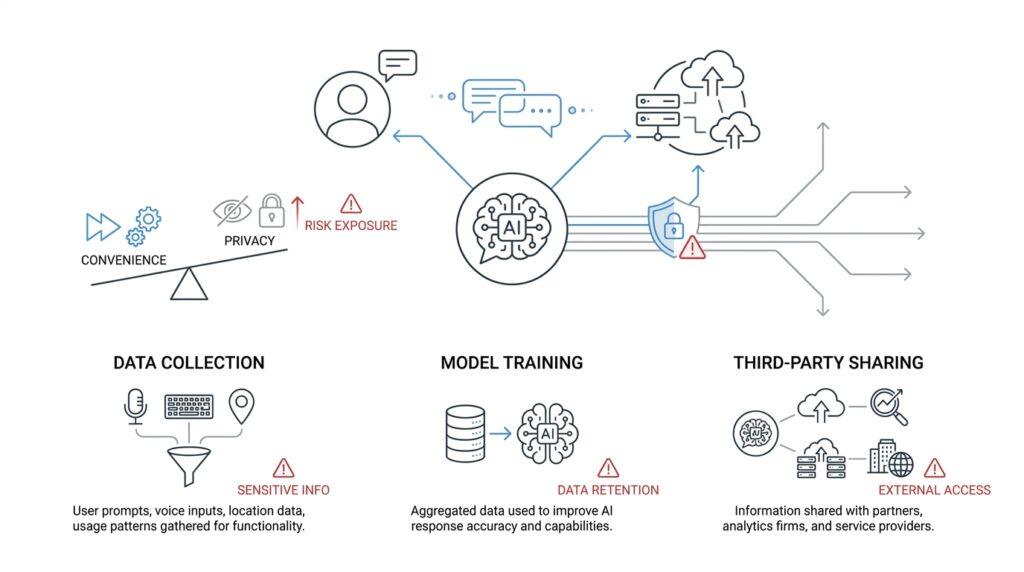
You can feel the shift the moment you open a chatbot: before you even finish your first question, the service has already started noticing things in the background. Chatbots collect automatically not only the words you type, but also the signals that travel with your visit, like your IP address, browser type, device details, timestamps, and cookies, which are small files stored on your device to help a service recognize a session later. NIST’s site-privacy guidance describes this kind of automatic collection on web services, and major AI products disclose similar logging, usage, and device data in their privacy notices.
That matters because the first layer of chatbot privacy risks is often invisible. Your prompt may look like a single message, but the service can also receive the files, images, audio, or video you attach, along with feedback you leave and the account information tied to your use. OpenAI and Google both say they collect prompts and other uploaded content, and Google also notes that Gemini can store transcripts and recordings from voice interactions. In other words, the chatbot is not only reading your question; it may also be learning from the shape of the question, the format of the attachment, and the context wrapped around it.
Once we zoom in a little more, the picture becomes even clearer. Metadata is a simple word for information about your activity rather than the activity itself, and in chatbot privacy, that can include the date and time you accessed the service, the pages or features you used, your country or time zone, your device model, and the browser settings your system sends along automatically. NIST says that session monitoring can evaluate usage patterns, timing, typing cadence, device and browser characteristics, geolocation, and IP address characteristics, and that these traits have privacy implications. That means a chatbot can build a quiet behavioral outline of you even when you think you are sharing only a harmless question.
Cookies and session data are the next piece of the puzzle, and they are easy to overlook because they sound technical rather than personal. A cookie is a small piece of state information that helps a service remember your session, and NIST notes that browsers commonly use session cookies to keep a session going across interactions; OpenAI likewise says it uses cookies and similar technologies to operate services, maintain preferences across sessions, and assist with authentication and support. That may sound convenient, but it also means the chatbot can recognize your device or browser later, which helps connect one visit to the next and makes your chatbot privacy risks more about continuity than any single message.
So if you have ever wondered, “What data do chatbots collect automatically?” the honest answer is that they usually collect a mix of content and context. The content is what you choose to say, upload, or record. The context is the digital trail that arrives around it: logs, identifiers, timestamps, location clues, device signals, and the session markers that let the service keep the conversation stitched together. That trail can be useful for safety, debugging, and personalization, but it can also reveal far more about you than the prompt alone suggests. Both OpenAI and Google offer controls such as temporary chats, activity management, and permission settings, which is a useful reminder that automatic collection is only part of the story; how much stays attached to you depends on what you share and which controls you turn on.
Where Conversations Get Stored (ftc.gov)
The real question is not whether a chatbot hears you for a moment, but where that conversation goes after you press send. In many services, the answer starts with your account history: the chat is saved so you can find it again later, and retention—the period a company keeps data—can extend beyond the moment you close the window. OpenAI says chats are saved to your account until you delete them, and even Temporary Chats can still be kept for up to 30 days for safety purposes. So when we talk about chatbot privacy, we are really talking about a trail that keeps following the conversation after the conversation feels finished.
That trail usually has more than one stop. A chat can live in your visible history, in the service’s internal systems, and in a backup, which is a spare copy kept for recovery or security. OpenAI’s privacy materials say personal data may be processed and stored on servers in different jurisdictions, including the United States, and that deleted chats may remain for a limited period before permanent deletion. In plain language, the message you typed may sit in more than one place at once, which is why deleting something from the screen does not always mean it disappears everywhere immediately.
Once a conversation contains health details, the storage question gets sharper. If you mention symptoms, medications, therapy, fertility, sleep, or another personal health topic, that exchange can become consumer health information, meaning health-related information a business collects from a person. The FTC says businesses that collect and share consumer health information cannot rely on HIPAA alone; they also have to avoid deceptive or unfair practices under the FTC Act, and some companies outside HIPAA may also fall under the Health Breach Notification Rule if unsecured health data is exposed. In other words, a chatbot transcript is not just text anymore when it holds sensitive health clues.
So where do those conversations sit in everyday life? Often, they sit inside the account that created them, which means anyone who can access that account can usually see the stored history. They can also sit inside systems used to keep the service running, protect against abuse, and support troubleshooting. OpenAI’s Temporary Chat FAQ says those chats won’t appear in history and won’t create memories, but it also says the company may still keep a copy for safety purposes. That is a useful reminder that “not visible to you” and “not stored anywhere” are two very different things.
If you are wondering, “Where are my chatbot conversations stored?” the safest answer is: wherever the service says they are stored, and sometimes wherever its support, safety, or legal systems need them to be. That may include the chat history you can see, hidden retention systems, and copies tied to legal obligations or abuse monitoring. The practical takeaway is not panic; it is awareness. Before you share something deeply personal, especially health information, look for the service’s retention rules, delete options, and temporary or history-off settings, because those controls decide whether the conversation stays attached to you or becomes harder to trace later.
Who Can Access Your Data (ftc.gov)
Now that we know where a conversation can live, the next question is who can actually open it. That is the heart of chatbot privacy: your data does not sit in one locked box, because different people and systems may be able to reach it for different reasons. In a typical consumer AI service, that can include you, the company that runs the chatbot, its trusted service providers, any connected apps you authorize, and, in limited cases, government authorities or other third parties when the law or safety rules require it.
You usually have the first and most obvious kind of access: the access that comes with your own account. If the service saves your chat history, the account holder can usually review, delete, or manage it from inside the product, and that is why shared devices and shared logins deserve extra care. In enterprise setups, this becomes even more layered, because workspace admins can control which apps are enabled and may have access to audit logs or other admin-level records, even though end users still only see their own conversations.
Then comes the company itself, which is where many people underestimate chatbot privacy risks. OpenAI says a limited number of authorized personnel, along with trusted service providers, may access user content only when needed for abuse investigations, support, legal matters, or model improvement, and that access is restricted to a need-to-know basis with logging and training. That is a useful reminder that “private” does not always mean “never seen by anyone,” because humans may still review content when safety or support work requires it.
Trusted service providers are another group worth picturing clearly. These are outside companies that help run pieces of the service, such as hosting, customer support, analytics, or safety tooling, and they may access, process, or store data only under the chatbot provider’s instructions. In plain language, they are not supposed to treat your conversation like their own product; they are supposed to handle it as part of the job they were hired to do. That distinction matters because it explains why a prompt can travel beyond the chatbot’s front door without becoming public.
Connected apps and third-party services are where access becomes more like handing someone a spare key. Google says Gemini can work with connected apps, including Google apps and third-party services, and if you use Gemini to interact with those services, they process your data under their own privacy policies. OpenAI’s enterprise materials say connected apps can also send and retrieve information from internal sources and third-party applications, while your organization’s existing permissions still apply. So if you are asking, “Who can access my chatbot data after I link another app?” the answer is often: the chatbot, the app, and whichever systems each one depends on.
Sharing features can widen that circle even further. Google notes that when a user-generated Canvas app is involved, the creator can see data you share, can store it where they choose, and anyone with the public link may be able to view or edit it. That is a good example of why chatbot privacy is not only about the model reading your words; it is also about whether you have turned a private exchange into something collaborative, published, or link-accessible. The moment a feature invites other people in, the audience changes too.
Finally, there is the outer ring: legal and regulatory access. OpenAI says it may disclose personal data to government authorities or other third parties to comply with law, protect rights and safety, or prevent fraud and illegal activity, and the FTC reminds businesses that consumer health information can trigger rules beyond HIPAA, including the FTC Act and the Health Breach Notification Rule. That is especially important if a chatbot conversation includes symptoms, medications, or other health details, because those words can become sensitive records with real compliance consequences. In other words, who can access your data depends not only on the app, but also on what kind of data you gave it in the first place.
How Prompts Reveal Sensitive Details (arxiv.org)
Now that we’ve looked at where chats can be stored and who can reach them, we can zoom in on a quieter danger: the prompt itself can expose sensitive details before the model even answers. A prompt is the text you send to the chatbot, and once you fill it with names, medical facts, job history, or location clues, you are no longer asking a general question—you are handing over context that may be repeated, summarized, or reshaped into something else. Can a chatbot leak the very details you paste into the prompt? The paper behind this section says yes: the information you provide can appear directly in the output, which creates privacy risk when the input contains personal or confidential material.
This is where two technical ideas matter. Input regurgitation means the model copies pieces of the prompt back into its response, sometimes almost word for word. In-context learning means we guide the model by placing examples, records, or instructions inside the prompt itself, like showing it a few sample cards before asking it to sort the rest. The study notes that sensitive information often enters chatbots through conversation, database records, or examples for in-context learning, so the problem is not limited to one kind of task. In other words, chatbot privacy risks begin the moment the prompt starts carrying real-world details.
The clearest example from the paper is a summarization task that sounds harmless on the surface. When ChatGPT was asked to summarize cover letters for 100 candidates, it retained personally identifiable information, or PII—details that can identify a person—verbatim in 57.4% of cases. The paper also found that this retention was not evenly distributed across subgroups, which means the model did not leak every kind of sensitive detail in the same way. That matters because a task like summarizing can feel safe, yet the model may still carry over names, contact details, or other identifiers that you never intended to preserve.
The encouraging part is that prompts can also be used to steer the model toward safer behavior. The paper tested direct instructions that asked the chatbot to provide compliant outputs, using privacy rules such as HIPAA, the Health Insurance Portability and Accountability Act, and GDPR, the General Data Protection Regulation, as guides. When the model received that kind of instruction, it omitted a significant amount of PII from its answers. That does not make the risk disappear, but it shows that prompt wording can act like a signal flare: it can either invite the model to repeat sensitive details or ask it to leave them out.
This is why prompts deserve the same care we usually reserve for finished documents. A short request about hiring, healthcare, or a personal assistant can contain enough clues to identify a person, reconstruct a situation, or expose something private even if the final answer looks polished and harmless. The model may also echo the structure of your input, which means a tiny detail tucked into the prompt can survive into the output in ways that feel surprisingly durable. When we talk about chatbot privacy, we are not only talking about what gets stored behind the scenes; we are also talking about what gets carried forward in the text itself.
So the safest habit is to treat every prompt like something the system might read twice: once to answer you, and once to reuse in the answer. If you can replace a name with “the applicant,” a date with “last month,” or a location with a broad region, you lower the chance that sensitive details will travel farther than you expect. That is the practical lesson here: the prompt is not just a question, it is a container, and the smaller and cleaner we make that container, the less likely it is that the chatbot will reveal more than we meant to share.
Ways To Reduce Privacy Exposure (airc.nist.gov)
If the earlier sections felt like peeking behind the curtain, this is the part where we learn how to keep some of that curtain in place. Reducing privacy exposure starts with a simple shift in habits: treat every chatbot exchange as if it could travel farther than the screen in front of you. The good news is that you do not need to stop using AI tools to do that well; you need to use them more deliberately, with chatbot privacy in mind from the first sentence you type.
The first and most powerful habit is to share less context than you think the model needs. A prompt is easiest to protect when it contains the smallest useful version of your question, not the full story behind it. Instead of pasting a complete document, long personal explanation, or identifiable record, we can replace names with roles, exact dates with rough timeframes, and locations with broader regions. That tiny edit often makes a big difference, because it keeps the service from seeing details it never needed in the first place and lowers the chance of accidental privacy exposure in both the prompt and the reply.
The next layer is to control what the service keeps after the conversation ends. If a product offers temporary chats, history-off mode, or similar settings, those are worth using when the topic feels sensitive, private, or temporary. A temporary chat usually means the conversation will not appear in your regular history, which helps reduce everyday visibility, even though the service may still retain copies for safety or legal reasons. So when you ask, “How do I reduce privacy exposure in a chatbot?” the answer often begins with the settings menu, not the prompt box.
We also want to be careful about what gets linked into the conversation. Connected apps, shared workspaces, and authorized third-party tools can make a chatbot more useful, but they also widen the circle of access. Before turning on an integration, pause and ask whether the app truly needs to see your conversation, your files, or your account history to do the job you want. On shared devices and shared logins, this matters even more, because one person’s convenience can become another person’s surprise.
Another practical step is to separate ordinary questions from high-sensitivity topics. If you are asking about health, finances, work issues, legal concerns, or anything that could identify someone, use the chatbot sparingly and keep the input narrow. That means avoiding attachments you do not need, skipping unnecessary personal details, and checking whether the service gives you a way to delete chats or clear history afterward. These small choices do not eliminate chatbot privacy risks, but they do shorten the trail your conversation leaves behind.
It also helps to remember that privacy protection is not only about what you send; it is about who can later find it. Review account permissions, sign out on devices you do not control, and avoid leaving history open on browsers that others use. If you are in a work setting, check whether the organization has admin controls, audit logs, or approved apps that change who can see what. That extra minute of caution may feel unglamorous, but it is often the difference between a private exchange and a reusable record.
The safest pattern is to make privacy part of the workflow, not an afterthought. We decide what belongs in the prompt, choose the least revealing settings, and then trim the leftovers by deleting or limiting history when the task is done. That rhythm may feel new at first, but it quickly becomes second nature, and it is one of the clearest ways to reduce privacy exposure while still getting useful help from AI.