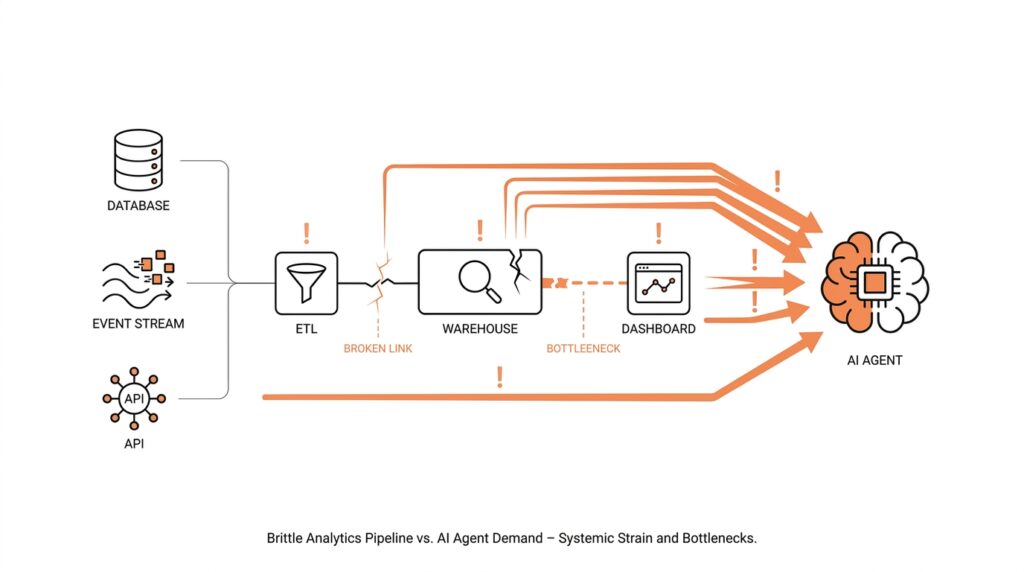
How AI Agents Consume Data
When you first meet an AI agent, it can feel a little like watching a new hire walk into the office and ask for the keys to everything. It does not read data the way a person does, slowly opening one dashboard after another. Instead, an AI agent is software that can decide what to look at, call tools, and move from one piece of information to the next as it works toward a goal. That is why AI agents consume data in a very different way from humans, and why many analytics pipelines are not ready for them.
The easiest way to picture this is to imagine a busy kitchen. A person cook can glance at a recipe, peek into the fridge, and remember the rest. An agent, by contrast, needs ingredients in forms it can inspect, compare, and reuse without losing track of the sequence. It may pull from a database, a report, an application programming interface, or an event stream, which is a live feed of changes as they happen. The moment you ask, “How do AI agents consume data?” you are really asking how they gather evidence fast enough to keep reasoning.
That difference matters because AI agents do not consume data as a finished story; they consume it as raw material. A dashboard is great for a human because it compresses complex activity into charts, labels, and summaries. An agent often needs the opposite: structured records, metadata, and precise context, which means the data must carry its own meaning instead of relying on a person to interpret it. If a field name is vague, a timestamp is missing, or a metric is defined three different ways, the agent may still act, but it will act on shaky ground.
This is where analytics pipelines start to show their age. Traditional analytics pipelines are built to move data from source systems into storage, transform it for reporting, and then serve it to people through dashboards or scheduled reports. They are excellent at producing snapshots, but AI agents often need continuous access, low-latency responses, and a reliable way to fetch the exact slice of data they want in the moment. In other words, the pipeline was designed to answer, “What happened last week?” while the agent wants to ask, “What is happening right now, and what should I do next?”
Another wrinkle appears when the agent needs multiple kinds of data at once. It might read customer history from a warehouse, check a ticketing system for recent complaints, and inspect a live inventory feed before making a recommendation. That means the AI data consumption path has to merge structured data, which fits neatly into rows and columns, with unstructured data, which includes text, images, logs, and other messy sources. The harder part is not storing all of it; the harder part is keeping the context attached so the agent can tell which facts belong together.
So the real challenge is not volume alone, but readiness. An AI agent does best when data is searchable, permissioned, current, and described in a way both machines and humans can trust. If you strip away the mystery, AI agents consume data through a loop of fetch, interpret, compare, and act, repeating that cycle many times in a single task. That loop can expose every weak seam in an old analytics stack, from stale caches to inconsistent schemas, which is why the infrastructure question becomes just as important as the model itself.
Once you see that pattern, the next question becomes much more practical: what has to change in the pipeline so agents can move through data safely and intelligently? That is where we start shifting from ordinary reporting systems toward systems that can support AI data consumption in real time.
Where Analytics Pipelines Break
Now that we’ve seen how an AI agent fetches, interprets, compares, and acts, the weak spots in an analytics pipeline start to look less mysterious. Traditional analytics pipelines were built like a conveyor belt for reporting: data moves in, gets transformed, and then lands in dashboards or scheduled reports for people to read later. That works well for batch processing, which handles data in groups, but it does not match the way agents ask questions in the moment or the way streaming systems keep processing continuously. When you ask, “Why does my analytics pipeline break for AI agents?” the first answer is often timing: the pipeline was designed for yesterday’s summary, not today’s decision.
The next break shows up as soon as freshness matters. An AI agent does not wait politely for a nightly job to finish, because its whole job is to respond while the situation is still unfolding. If the pipeline only refreshes every few hours, the agent may make a choice from stale data, and that can be worse than having no answer at all. Google Cloud’s documentation draws a clear line between batch pipelines that run on a schedule and streaming pipelines that start immediately and track data freshness over time, which is a useful way to see the gap. In plain terms, the pipeline can be perfectly healthy for reporting and still be too slow for AI data consumption.
Then there is the problem of meaning, and this is where many teams feel the ground shift under their feet. A human can often forgive a messy label or a missing timestamp because we infer context from the surrounding dashboard, but an agent needs the data to explain itself more directly. If one system says “status,” another says “state,” and a third leaves the field blank, the agent has to guess, and guessing is where analytics pipelines begin to wobble. Databricks’ documentation on unstructured data and file metadata shows why context matters so much: metadata, access control, and file-level details help tie the raw material to something trustworthy. Without that layer, AI agents consume data as fragments instead of facts.
The break becomes even clearer when the agent has to cross more than one kind of system. A warehouse table may hold structured data, which means neat rows and columns, while a support ticket, a log file, or an image is unstructured data, which means it does not arrive in a tidy spreadsheet shape. Agents often need both at once, because the useful answer lives in the combination, not in any single source. That is where older analytics pipelines struggle: they can move data around, but they do not always preserve the connections the agent needs to see which customer, event, and document belong together. In practice, AI data consumption asks the pipeline to act less like a warehouse shelf and more like a library with cross-references intact.
Finally, pipelines break when they are invisible, inflexible, or too loosely governed for the decisions they are expected to support. A lot of batch systems were designed with a forgiving mindset: if something goes wrong, rerun the workflow and inspect the output later. AI agents, by contrast, need data that is searchable, permissioned, current, and observable while they work, because they may call the same source many times inside one task. Google Cloud’s Dataflow guidance around pipeline stages, freshness objectives, and recurring jobs hints at the operational side of this problem: you need to see where time is being spent and where quality is drifting before the agent runs into it. That is why the failure is rarely one dramatic crash; it is usually a series of small mismatches that only become obvious when an agent starts asking for exact, live answers.
Schema Drift and Freshness
After the earlier pieces of the puzzle, this is where the pipeline starts to feel the strain. Schema drift is what happens when source data stops looking like yesterday’s version of itself: a column appears, disappears, gets renamed, or changes type. For a person, that feels like opening the same filing cabinet and finding the folders rearranged; for an AI agent, it can turn a confident lookup into a guess. The agent is not reading a story with room for interpretation — it is depending on the shape of the data to stay trustworthy.
The tricky part is that schema drift does not always arrive with a loud failure. Sometimes it sneaks in as a field that looks familiar but behaves differently, like a date arriving as text one day and as a true date the next. Databricks’ Auto Loader is built around that reality: it tracks schema over time, merges in new columns, and can place unexpected values into a rescued data column instead of dropping them on the floor. It also lets you use schema hints when you already know more about the data than the source system does. The lesson is not to freeze the pipeline forever; it is to make the pipeline notice change without losing its footing.
Freshness is the other half of the story, and it matters because an AI agent is making decisions in motion, not writing a monthly report. In Google Cloud Dataflow, data freshness is the gap between event time and processing time, so the bigger that gap grows, the farther the pipeline falls behind reality. That metric applies to streaming jobs, and Google Cloud recommends watching it alongside stage-level behavior so you can spot slow or stuck work before it turns into bad answers downstream. If schema drift is the shape problem, data freshness is the clock problem.
Once we put those two together, the failure mode becomes easier to recognize. A curated table in Dataplex is expected to follow a well-defined schema without drift, which is perfect when you are serving clean, stable analysis data. AI workflows, though, often begin with raw or semi-structured sources that are still changing, so the pipeline has to carry context as carefully as it carries values. Databricks’ hidden _metadata column is a good example of that idea: it preserves file-level provenance so the downstream system can tell where a record came from, which is exactly the kind of breadcrumb trail an agent needs when it is comparing live inputs.
So how do we keep schema drift and freshness from becoming silent saboteurs? We give the pipeline contracts and alarms: schema evolution rules or schema hints for structure, rescued-data handling for surprises, and freshness objectives for latency. That means treating the data model like a living agreement instead of a fixed spreadsheet, and treating freshness like a visible service-level promise instead of an afterthought. The question teams eventually have to ask is very human and very practical: is this data current enough for an agent to act on it right now? When the answer comes from monitoring instead of hope, AI data consumption starts to feel controlled rather than improvised.
Add Data Contracts and Limits
When we start adding data contracts and limits, the pipeline stops feeling like a loose conveyor belt and starts feeling like a guarded doorway. A data contract is a written agreement about what a dataset will contain, how it will be shaped, and when it should arrive, while limits are the boundaries that keep an AI agent from pulling too much, too often, or from the wrong place. That matters because AI data consumption works best when the machine can trust the edges of the system as much as the data inside it.
Think of it like handing someone a set of labeled boxes instead of a pile of loose objects. The label tells you what belongs inside, the box size tells you how much can fit, and the seal tells you if anything changed along the way. In the same way, data contracts give the agent a stable promise about schema, freshness, and meaning, so it does not have to guess whether a field is optional, renamed, or delayed. If you have ever wondered, “How do we keep AI agents from misreading our analytics data?”, this is where the answer starts.
The first job is to make the contract plain enough for both people and systems to follow. We spell out the field names, the allowed data types, the required columns, and the definition of important metrics so nobody has to infer them later. We also define freshness expectations, which means how old the data can be before it is considered too stale to trust. That turns schema drift from a surprise into a visible change, and it gives AI data consumption a clear rulebook instead of a moving target.
Limits matter for a different reason: agents can be curious in a way that is expensive. Without guardrails, an agent may request an entire table when it only needs a small slice, or it may keep rechecking the same source and create unnecessary load. So we set limits on row counts, time windows, request frequency, payload size, and even the depth of historical lookback the agent is allowed to use. These limits protect the pipeline, but they also protect the agent from wandering into noisy data it does not need.
The real payoff appears when contracts and limits work together. A contract says, “This data must look like this,” and a limit says, “This is how far the agent may reach.” One handles correctness, the other handles restraint, and together they make AI data consumption more predictable. That combination is especially useful when the agent is pulling from more than one source, because it reduces the chance that a fast-moving live feed will get mixed with a slower, older report and treated as if both were equally fresh.
We also want the contract to fail loudly when something changes. If a column disappears, a value arrives in the wrong format, or a source starts missing its delivery window, the pipeline should flag that problem instead of quietly passing it along. That way, the agent does not build a decision on a broken assumption and then act with false confidence. Data contracts are valuable not because they make change impossible, but because they make change visible at the moment it matters.
Once those rules are in place, the pipeline becomes much easier to reason about. The agent knows what to expect, the data team knows what to enforce, and the business gets a cleaner path from source to action. That is the practical promise of data contracts and limits: they turn AI data consumption from a guessing game into a governed process, which is exactly what a modern analytics pipeline needs before it can support real agent behavior.
Track Lineage and Observability
Once an AI agent starts answering questions, the unsettling part is not the answer itself; it is not knowing how the answer was assembled. If a recommendation looks off, you need breadcrumbs back to the source and a live view of whether the pipeline was healthy at that moment. That is why lineage and observability matter so much in AI data consumption: lineage shows where the data came from and how it moved, while observability shows whether the system was current, healthy, and behaving the way you expected. If you have ever asked, “Why did the agent say that?”, these are the first places we look.
Lineage is the story of the data itself, told step by step. In Databricks Unity Catalog, runtime data lineage is captured across queries run on Databricks, supported for all languages and tracked down to the column level, so you can see notebooks, jobs, and dashboards tied to the same data flow. Unity Catalog also exposes lineage in Catalog Explorer in near real time and through lineage system tables, which means you can inspect it visually or query it programmatically when you need to investigate a strange result. If your process reaches outside the platform, external lineage metadata can extend the picture to first-mile sources like Salesforce or MySQL and last-mile tools like Tableau or Power BI, giving you an end-to-end view instead of a partial one.
Observability answers the next question: not only where did the data come from, but was it arriving on time and moving cleanly through the pipeline? Google Cloud’s observability tools pair Cloud Logging with Cloud Monitoring, and Cloud Monitoring collects metric data so you can see how applications and services are performing. For Dataflow, Google Cloud’s monitoring dashboard can help detect quota errors, anomalous autoscaling, and slow or stuck streaming jobs, while Dataflow’s observability charts surface data freshness, system latency, throughput, and CPU utilization. That freshness signal matters because it measures the gap between event time and processing time, which is often the gap between a trustworthy answer and a stale one.
Put the two together, and the picture becomes much clearer. Lineage tells you which table, file, or transformation fed the agent; observability tells you whether that path was delayed, blocked, or quietly drifting while the agent was making its decision. Databricks’ lineage system tables are especially useful here because they capture read and write events that can be queried later, so you can move from “something went wrong” to “this notebook read that table, transformed these columns, and updated this downstream asset.” That kind of evidence is what separates a bad model answer from a bad data path, and it is exactly what teams need when AI data consumption starts touching many systems at once.
The practical habit is to make every important transformation leave a trail and every important delay leave a signal. In practice, that means preserving source context, surfacing freshness thresholds, and extending lineage beyond the warehouse when data is ingested from one system and consumed in another. It also means watching the health of the pipeline at the same time you watch the shape of the data, because an agent can make a perfectly reasoned decision from the wrong snapshot if no one is watching the clock. When lineage and observability work together, AI data consumption becomes something you can explain, audit, and trust instead of something you have to guess at later.
Secure Access and Approvals
Once lineage tells us where data came from, the next question is who gets to touch it. That is the heart of secure access for AI agents: the agent should work with the smallest set of permissions it needs, not a copy of every human credential in the company. In Google Cloud, IAM (Identity and Access Management, the system that controls who can do what) is built around principals such as users, groups, and service accounts, and it follows the least-privilege idea of granting only the access a task needs. In Databricks Unity Catalog, data is secure by default and access starts from explicit privileges on securable objects rather than an open warehouse.
How do we give an AI agent access without handing it the whole warehouse? We do it with a non-human identity, such as a service principal in Databricks or a service account in Google Cloud, and then grant only the privileges the agent actually needs. For a Unity Catalog table, that often means USE CATALOG, USE SCHEMA, and either SELECT or MODIFY, which cleanly separates read-only agents from write-capable ones. That separation matters because AI agents consume data best when their permissions match the job in front of them, not the worst-case job someone imagines later.
Approvals are the human checkpoint in that flow. Databricks uses the BROWSE privilege to let people discover metadata and request access without granting data access itself, and access request destinations can route those requests to an owner, email, Slack, Microsoft Teams, PagerDuty, a webhook, or a redirect URL. If no destination is configured, users cannot request access, so the approval path needs to be designed on purpose instead of assumed. That is a small but important shift from older analytics pipelines, where people often shared credentials first and asked questions later.
The safest pattern is to separate discovery from consumption. People can browse the catalog, see names, tags, and descriptions, and ask for access, while the agent itself gets only the exact table, schema, or external location it needs. Databricks recommends using groups to grant access and reserving direct MODIFY access on production tables for service principals, which keeps automation from borrowing a human seat at the table. In Google Cloud, the same idea shows up in IAM: you grant roles to principals and keep the scope as narrow as possible.
Approvals should leave a trail, too. Google Cloud records administrative and access activity in audit logs, and IAM policy changes can be reviewed through logs that include SetIamPolicy events. That means when an AI agent suddenly starts failing, or when it begins seeing more data than expected, you can check whether the permission model changed instead of treating the symptom as a model problem. The goal is not to slow the workflow down; it is to make every permission change explainable after the fact.
So the rule of thumb is simple to remember even if the machinery is not: the agent should discover, request, receive, and act inside a governed path. In practice, that means secure access, explicit approvals, and least-privilege permissions working together so AI agents consume data without turning your analytics pipelines into a free-for-all. When we build that guardrail in from the start, the pipeline feels less like a shared secret and more like a controlled service we can trust.