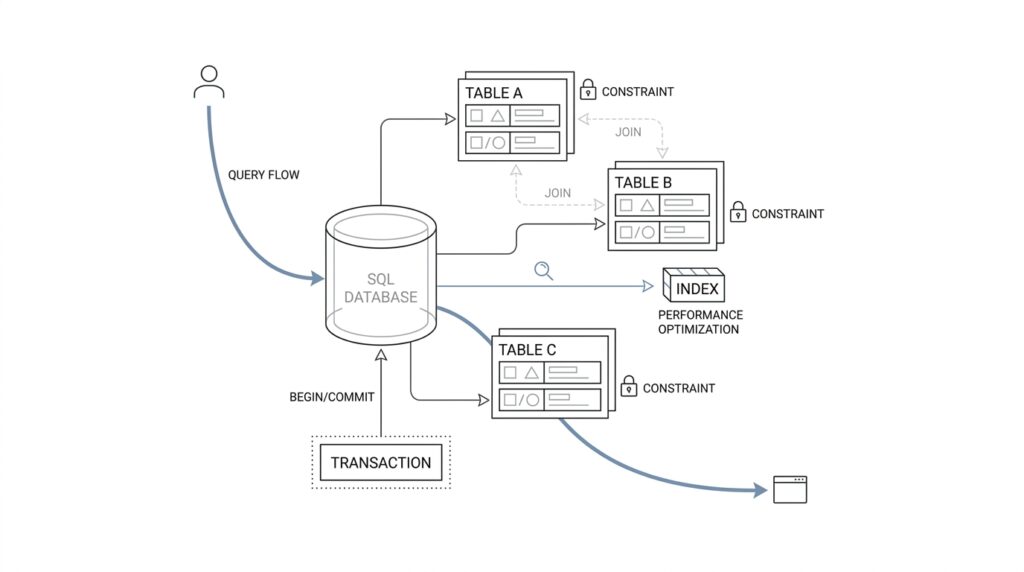
Think in Query Shapes
When you start thinking about a database through the lens of SQL query shapes, the first shift is almost physical: you stop seeing tables as the main character and start seeing questions as the main character. A query shape is the pattern a query follows, including which columns it reads, how it filters rows, how it joins tables, and whether it sorts or groups the results. If you have ever asked, “How do I design a database for the queries I actually run?” you are already standing at the right door.
This matters because most real systems do not fail from a lack of data; they slow down because the database has to work too hard to answer common questions. Imagine a library where every request forces the librarian to carry every book to the front desk before looking for the one you want. That is what a poorly matched schema feels like. When we think in query shapes, we design the shelves, labels, and paths so the common requests are the easiest ones to serve.
The practical trick is to describe each important query in plain language before you reach for indexes or normalization rules. Are you fetching one user by email, listing the latest orders for an account, or aggregating sales by day across a large date range? Each of those has a different SQL query shape, and each one asks the database to move through data in a different way. A point lookup wants a direct path, a feed wants an efficient sort order, and an aggregate wants a structure that makes grouping cheaper.
Once you see that, table design starts to feel less like abstract architecture and more like route planning. Suppose your application constantly asks for “all active subscriptions for a customer, newest first.” That sentence already tells you a lot: you care about customer_id, status, and created_at, and you likely care about them together. A composite index, which is an index built from multiple columns in a chosen order, can turn that request from a search across a crowd into a quick walk to the right aisle.
The same idea helps with joins, which are the database’s way of connecting related rows from different tables. A join-heavy query shape often tells you that two pieces of information live too far apart for how often they are read together. That does not mean every join is bad; it means you should notice the cost of the path. If a report repeatedly combines customers, invoices, and payment events, the query shape may justify a reporting table, a denormalized view, or at least an index that keeps the join keys easy to follow.
This way of thinking also keeps us honest about write patterns. A schema that is perfect for reading a dashboard at high speed can become awkward if it creates too many moving parts on every update. So we are not chasing one perfect structure; we are balancing the shapes of the most important reads against the cost of keeping the data fresh. Good SQL database design usually comes from knowing which query shapes are frequent, which are rare, and which ones must feel instant.
As you practice this, a useful habit is to read application code and ask what shape it implies. Is this query looking for a single row, a short list, or a large time series? Does it filter early or sort late? Does it need exact answers now, or can it tolerate precomputed results? The more clearly you can answer those questions, the more naturally your schema, indexes, and access paths begin to fit together.
That is the heart of the mental model: tables store data, but query shapes reveal how that data will actually be used. When you design around those shapes, the database feels less like a maze and more like a well-marked road network, built for the trips your application keeps making.
Map Entities and Keys
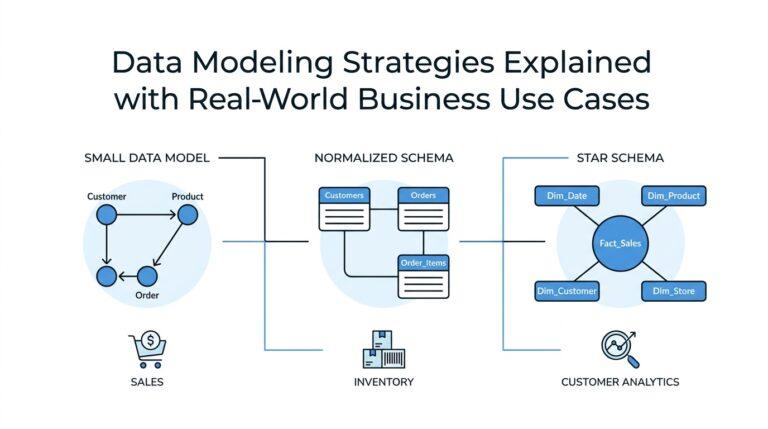
After we’ve mapped the query shapes, the next question feels more human: what are the things in this system, and how do we recognize them every time they show up? That is where entity mapping comes in. We look at the real-world nouns behind the application—customers, orders, subscriptions, invoices—and decide which ones deserve their own tables, because a modern SQL database design works best when each table has a clear identity and a clear job.
The first anchor is the primary key, which is the column, or group of columns, that uniquely identifies a row. PostgreSQL’s documentation is blunt about this: a primary key is a unique identifier, it is always unique and not null, and a table can have only one of them. That matters because once every row has a stable identity, we can talk about it the way we talk about a person in a room instead of a face in a crowd.
From there, we make one important distinction: a value can be meaningful without being the row’s identity. In practice, that means a business field like an email address or product code can be protected with a unique constraint, while the primary key stays focused on identifying the row itself. PostgreSQL notes that foreign keys may reference either a primary key or a unique constraint, which is a helpful reminder that “unique” and “identity” are related, but not the same thing.
Once the table has an identity, foreign keys give us the bridges between entities. A foreign key is a column, or set of columns, whose values must match a row in another table, and that is how the database keeps related data honest. If an orders table points to customers through customer_id, the database can prevent orphaned orders and enforce referential integrity, which is a formal way of saying the relationships in your model stay real instead of drifting apart.
Sometimes the identity of a thing is not one column at all, but a combination. PostgreSQL supports primary keys that span more than one column, which makes sense when a row is only unique inside a larger context. A line item, for example, may be identified by order_id plus line_number, and a join table may be identified by the pair of entities it connects; in those cases, the composite key is not a workaround, it is the shape of the truth.
This is where entity mapping starts to feel like drawing a map instead of writing a checklist. You place each entity where it belongs, give it one way to be identified, and then draw the relationship lines with foreign keys so the paths are explicit. If you have ever wondered, “How do I map entities and keys in SQL without making the schema confusing?” the answer is to let identity stay stable, let relationships stay visible, and let the database enforce the parts of the model that should never be guessed at runtime.
Normalize for Integrity
Once every entity has a stable identity, the next challenge is keeping its facts honest over time. That is where normalization comes in: it is the practice of organizing SQL tables so each piece of information lives in the right place, with the least possible duplication. In plain language, normalization for integrity means we design the schema so the database helps us avoid contradictions before they start. Instead of copying the same detail into several rows and hoping every copy stays in sync, we give that detail one home and link to it through keys.
If you’re asking, “Why not keep everything in one wide table?” you are asking the right question. A wide table can feel comforting at first because all the information sits in one place, like a single spreadsheet tab. But that comfort fades when a customer changes a phone number, a product gets renamed, or an address shifts, because now the same fact may exist in several rows and several tables. That is how update anomalies appear, which are situations where one real-world change requires multiple edits and one missed edit leaves the data inconsistent.
Normalization protects integrity by making repetition feel expensive in the design phase instead of in production. When we separate customers, orders, and addresses into their own tables, we are not being tidy for its own sake; we are telling the database where each fact belongs. A customer’s name belongs with the customer, an order’s date belongs with the order, and the connection between them belongs in a foreign key. That separation gives us referential integrity, meaning the database can enforce that a child row really points to a valid parent row instead of a ghost.
The classic normal forms help us think through this step by step. First normal form means each column holds one value, not a bundle of values squeezed into a single cell. Second normal form and third normal form go further by pushing facts out of a table when they depend on only part of a key or on something other than the key itself. You do not need to memorize the rules like a chant to benefit from them; you need to notice the pattern they protect: one fact, one place, one clear dependency.
That phrase, dependency, matters because it reveals the real shape of integrity. A dependency is just a relationship where one value determines another, like a product_id determining the product name. If we store product names inside every sales row, we create a hidden agreement that every copy must stay identical, and hidden agreements are where data starts to drift. Normalization for integrity makes those agreements explicit by moving the shared fact into its own table and leaving the sales row to reference it.
This is also why normalization is not the enemy of performance or practicality. Good SQL database design does not normalize blindly; it normalizes to protect truth, then watches the query shapes we discussed earlier to see where the reads actually go. If a report needs a faster path, we can add an index or a carefully chosen derived table later, but we do that with eyes open. The default posture stays conservative: keep the source of truth clean, keep the relationships clear, and let the database catch mistakes instead of quietly recording them.
As you work through a schema, the question to keep asking is not, “How do I store everything?” It is, “Where should each fact live so the database can defend it?” That shift is subtle, but it changes everything. Normalization turns SQL database design from a pile of duplicated fields into a system that resists drift, preserves consistency, and gives every important piece of data a place it can trust.
Index for Access Paths
Once we know the query shapes, the next question is less about storage and more about travel: which path should the database take to answer each question? That path is the access path, meaning the route the planner chooses to find rows. An index is not a magic speed button; it is more like a side road that only helps when it lines up with the trip you keep making. If you have ever wondered, “What kind of index do I need for this SQL query?” you are really asking which access path best fits the shape of the work.
PostgreSQL’s planner treats that decision as a cost problem, which is why an index does not automatically win every time. A sequential scan reads the table from start to finish, an index scan uses the index to locate matching rows, and a bitmap scan first gathers matching locations from one or more indexes and then visits the table in a more organized way. That is a useful mental model because it explains why small tables, broad filters, or poorly matched indexes can still lead the planner to choose the slower-looking, but actually cheaper, straight-through route.
This is where multicolumn indexes start to feel like lane planning instead of guesswork. A multicolumn B-tree index works best when your query constrains the leading, leftmost columns, so the order of the columns matters a great deal. In practice, that means we usually place the most selective equality filters first, then the range or ordering column that follows the story of the query. For a query like “latest active subscriptions for one customer,” the database can move much more directly when the index mirrors that rhythm instead of scattering the important columns across separate places.
The next refinement is a covering index, which is an index built to answer a query without visiting the table heap when all needed columns are already present. PostgreSQL supports this through index-only scans, and with INCLUDE columns we can keep extra payload columns in the index without making them part of the search key. That sounds attractive, and it often is, but the tradeoff is real: wider indexes take more space, and they are only worth the cost when the table changes slowly enough that the planner can often avoid touching the heap.
Partial indexes give us another practical lever when most of the table is noise for a specific workload. A partial index is an index built on only the rows that match a predicate, which is the condition that defines the subset. This is a strong fit when your hot path always asks for the same slice, such as active rows, recent rows, or unreconciled rows, because you shrink the index and focus it on the rows the application actually reaches for. The catch is that the predicate has to match the workload closely, or the planner will not be able to use it.
The really useful habit here is to read your query the way the planner does. Ask whether it filters on the leftmost index columns, whether it returns only columns already stored in the index, and whether it touches a narrow slice or a large fraction of the table. Then confirm the result with EXPLAIN, which shows the execution plan and tells you whether PostgreSQL chose a sequential scan, index scan, or bitmap scan for that statement. If the planner still prefers a sequential scan, that is not a failure; it is often the database telling us that the index does not match the access path well enough to justify the extra work.
That is the mindset shift: we do not create indexes because indexes feel advanced; we create them because a specific query shape deserves a shorter road. When we design SQL database access paths this way, we end up with fewer accidental indexes, better-targeted performance, and a schema that feels like it was built with the application’s actual journeys in mind.
Design Transactions Carefully
After we’ve given each fact a home and each relationship a clear path, the next challenge is the moment when one action has to change several tables at once. That is where SQL transactions come in, and in SQL database design they are the safety net that keeps a half-finished write from becoming permanent damage. If you’ve ever wondered, “How do I design transactions carefully in a SQL database?” the short answer is that we treat them like a single promise: either every part of the change lands together, or none of it does.
A transaction is a group of database operations that the database handles as one unit. That idea matters because real application actions rarely touch only one row in one table; they often update an order, reserve inventory, write a payment record, and maybe adjust a customer balance. Without a transaction, one step could succeed while the next fails, leaving the data in an awkward in-between state. With a transaction, we turn that fragile sequence into a single story the database can finish or roll back.
This is where the familiar ACID model quietly enters the room. ACID stands for atomicity, consistency, isolation, and durability, and each word describes a promise the database tries to keep. Atomicity means all-or-nothing, consistency means the rules of the database still hold, isolation means concurrent transactions do not interfere too much with one another, and durability means committed changes survive a crash. You do not need to memorize the acronym like a spell, but it helps explain why transaction boundaries deserve so much care.
The most useful habit is to make transaction boundaries as small as the real work allows. A short transaction is easier for the database to protect because it holds locks, memory, and attention for less time. A long transaction, by contrast, is like asking several people to wait while you keep the door open and search for your keys; other sessions may be blocked, and contention can spread through the system. So when we design transactions, we try to keep the database work inside the transaction and move everything else outside it.
That usually means we should not leave a transaction open while waiting on a network call, a user decision, or a slow background service. A payment provider might stall, an email API might time out, or a user might pause for far longer than the database should be kept busy. If the transaction stays open during that pause, the database may hold locks longer than necessary and create a traffic jam for unrelated requests. The better pattern is to prepare the work, enter the transaction, write the minimum needed changes, and commit as soon as the database part is done.
Isolation level is the next knob worth understanding, because it controls how much one transaction can “see” of another while they overlap. Think of it like two people editing the same notebook: stronger isolation gives you cleaner separation, but it can also make the notebook harder to share at high speed. In SQL database design, we usually choose the weakest isolation level that still preserves correctness for the business rule we care about, because stronger isolation often costs more in blocking and retries. The question is not “What is the strongest setting?” but “What setting prevents the bug I actually fear?”
Careful transaction design also means being honest about failure. If a transaction can fail after partially doing work in memory, the application should be ready to retry, compensate, or surface a clear error. This is especially important when you are coordinating multiple writes, because deadlocks and serialization failures can happen even in a well-designed system when two transactions compete for the same rows. A good design does not pretend those failures never happen; it makes them expected enough that the application can recover cleanly.
The deeper pattern is the same one we’ve been following all along: match the design to the shape of the work. A transaction is not a place to hide every related action by default; it is a carefully drawn boundary around the changes that truly need to succeed together. When you design transactions carefully, SQL database design becomes more predictable, your data stays consistent, and the database can do its job without being asked to carry more than it should.
Plan Schema Evolution
After we have shaped queries, mapped entities, normalized for integrity, and tuned access paths, the next surprise is that none of it stays still for long. Real systems grow, and schema evolution is the art of changing a database without asking the application to stop and hold its breath. In SQL database design, this is where planning becomes a story of timing: we add new structure, keep old behavior alive long enough to be safe, and only remove the old path when we know nothing still depends on it.
The safest way to think about a database schema migration is to imagine a house renovation while people are still living inside. You do not knock out a wall first and then wonder where the hallway went; you build the new hallway before you close the old one. That same idea guides schema evolution in practice. We introduce changes in small, compatible steps so the current app version and the next app version can both survive during the rollout window.
This is why a good question to ask is, “How do you plan schema evolution without breaking the app?” The answer usually starts with the expand-and-contract pattern, which means we expand the schema first and contract it later. Expansion is the safe phase where we add a nullable column, create a new table, or introduce a new index without removing anything the old code still needs. Contraction comes only after the application has switched over and the old shape has gone quiet.
That order matters because code and data rarely deploy at exactly the same moment. A new release may be halfway through a rollout while some servers still run the old code and others run the new code, so the database must speak both dialects for a while. If we add a column called preferred_name, for example, we can keep writing full_name until the new code is ready, then backfill the existing rows, and finally switch reads over. A backfill is a one-time or repeated update that fills existing data with values needed by the new design, and it often becomes the bridge between old and new shapes.
Careful SQL database design also means treating destructive changes with respect. Dropping a column, narrowing a type, or changing a relationship can look harmless in a test database and still hurt in production if old jobs, reports, or services still rely on the previous shape. Instead of deleting immediately, we usually mark the old path as deprecated, watch logs and query behavior, and wait until we are confident no active workload still needs it. Schema evolution becomes much less risky when we let the database change in a way the application can absorb gradually.
Indexes need the same patience. A new query shape may need a new index before we switch traffic, while an old index may need to stay in place until every caller has moved on. In PostgreSQL, creating or dropping the wrong index at the wrong time can affect write performance, so planning the change matters as much as the change itself. That is one reason schema evolution is not only about tables and columns; it is also about the paths the planner uses to reach them.
The best migrations are also reversible in spirit, even when the exact change is not perfectly reversible in code. A reversible migration is one where we can move forward with confidence because we have either preserved the old path or written a clear fallback. That might mean using feature flags, which are runtime switches that let us turn a new behavior on or off without redeploying, or it might mean keeping both the old and new columns synchronized for a short period. The goal is to avoid a single irreversible leap when a series of smaller steps would keep the system calmer.
This is where schema evolution becomes less like maintenance and more like choreography. We are not only changing structure; we are coordinating application code, existing data, query shapes, indexes, and transaction boundaries so they keep working together while the shape shifts underneath them. In practical SQL database design, that is the hidden skill: make the new future possible, keep the old present safe, and let the database move between them without drama.