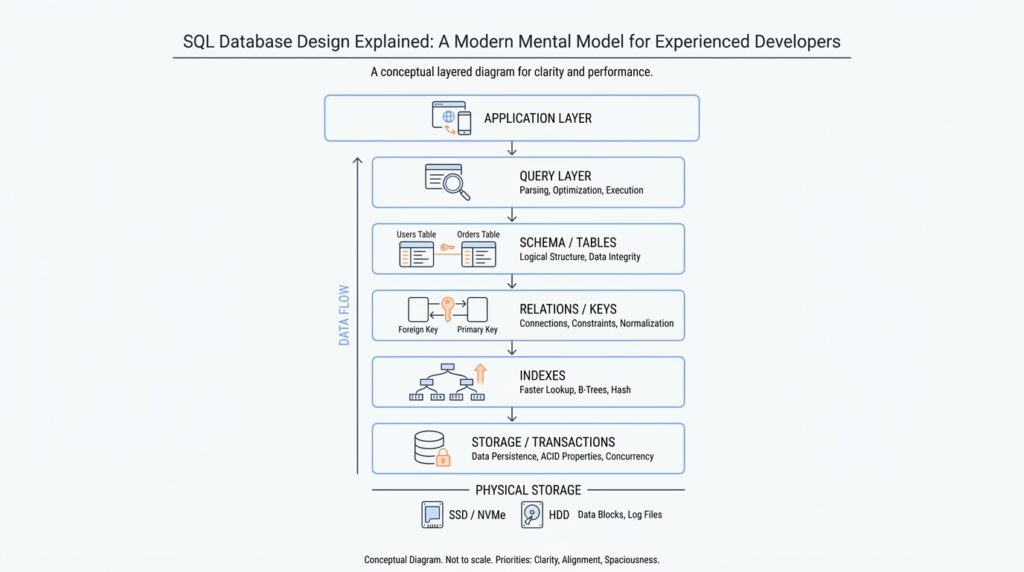
Start With Invariants
When you start with SQL database design, the first question is not “What tables do we need?” It is “What must never become false?” That question pulls us away from diagrams and into the real shape of the problem. An invariant is a rule that must stay true at all times, like “every order belongs to exactly one customer” or “a user email cannot appear twice.” Once we name those rules early, SQL database design stops feeling like guesswork and starts feeling like building a room with strong walls instead of hoping the furniture stays put.
This matters because databases are not just storage boxes; they are guardians of truth. If your application is the receptionist, the database is the locked front desk drawer where the official records live. You can move fast in application code, but if the underlying data model allows impossible states, the rest of the system will eventually trip over them. That is why experienced teams treat invariants as the foundation of SQL database design: they describe the facts that should survive network glitches, race conditions, and human mistakes.
So how do we find these rules? We start by telling the story of the data in plain language. What must always be true before a record is allowed to exist, and what must still be true after several records interact? A customer can exist without orders, but an order usually cannot exist without a customer. A product price can change over time, but a completed invoice should preserve the price that was actually charged. Questions like “What is the invariant here?” and “What would break trust in the data?” are often the fastest way to uncover the real design constraints.
Once we know the invariant, SQL gives us tools that turn the idea into enforcement. A PRIMARY KEY says, “this row has a unique identity.” A UNIQUE constraint says, “this value must not be duplicated.” A FOREIGN KEY says, “this record must point to a real parent record.” A NOT NULL constraint says, “this field is required.” A CHECK constraint says, “this value must satisfy a rule, such as quantity being greater than zero.” These are not decoration. They are the mechanical parts of SQL database design that keep the system honest when code paths multiply and users do unexpected things.
The important move is to design the invariant first and the table second. If you begin with tables, you often end up asking how to patch holes later. If you begin with invariants, the schema becomes a direct expression of the business rules. For example, if “one active subscription per account” is the real rule, then the model should make that difficult to violate, not merely hope the application remembers. In other words, the best SQL database design makes the wrong thing hard and the right thing easy.
This also changes how we think about application logic. The app should still validate inputs and guide the user, but it should not be the only thing standing between your data and corruption. That is a fragile arrangement, because bugs, retries, and parallel requests do not respect our intentions. When the database enforces invariants, the application can focus on workflow and experience while the schema protects the facts themselves. That division of labor is one of the quiet strengths of mature SQL database design.
If you are wondering, “What should I protect first?” start with the rules that would hurt the most if they were broken. Those are usually the invariants around identity, ownership, counts, and state transitions. A missing invoice number may be annoying; two payments for the same order may be disastrous. As we move forward, that lens will keep paying off, because every table, relationship, and constraint becomes easier to reason about when it answers a simple question: what truth are we refusing to let the database violate?
Choose Stable Primary Keys
Once we know the rules we are trying to protect, the next question is where each row gets its identity. In SQL database design, a primary key is the column, or small set of columns, that tells the database, “this row is the one and only row of its kind.” The important part is stability: the value should stay the same for the life of the record. If you have ever watched a folder label change while everyone still expects the papers inside to stay trackable, you already know why this matters. A good primary key gives every row a steady address, not a moving target.
So what is the best primary key for a SQL table? That question shows up early because the answer shapes everything that follows. When a key changes, every table that points to it has to change too, and that is where design starts to wobble. A stable primary key keeps relationships calm, indexes predictable, and updates small. In SQL database design, we want identities that behave like a birth certificate number, not a display name that might get edited next month.
This is where many teams discover the difference between a natural key and a surrogate key. A natural key is a real-world identifier, like an email address or product code, that already means something outside the database. A surrogate key is an artificial identifier, usually a number or a UUID, that exists only to identify the row. Natural keys can feel appealing because they look familiar, but they often change for business reasons. Surrogate keys, by contrast, are boring on purpose, and that boring quality is a strength.
Think about an email address. It is unique, and it feels like it should work as the identity for a user row. Then the user changes their email, and suddenly the “identity” needs to move, even though the person has not changed at all. That is a small example of a bigger rule: if a value can change for legitimate business reasons, it is usually too fragile to serve as the primary key. In practice, we often keep the email as a UNIQUE column, which means the database still prevents duplicates without tying the row’s identity to something editable.
That separation is one of the quiet superpowers of stable primary keys. The primary key says who the row is, while other constraints say what must remain true about that row. If the team later decides to rename a customer, correct a SKU, or normalize an external identifier, the internal identity does not need to move with it. The database can update the descriptive data without rewriting the row’s entire network of relationships, which keeps SQL database design cleaner and safer.
Stability also matters for performance and maintenance. Short, fixed keys are easier for indexes, which are the database’s lookup structures, to manage efficiently. They also make joins, the operations that connect rows across tables, more predictable. If the key is compact and never changes, the database spends less effort chasing references, and we spend less time explaining why a simple rename triggered a storm of updates. That is why stable primary keys often make large systems feel quieter and easier to reason about.
The practical pattern is usually straightforward: give each table a durable internal key, then protect the real-world identifiers with UNIQUE constraints. That way, you can still enforce business rules without turning every change into an identity crisis. The row keeps its steady anchor, and the human-facing data can evolve around it. Once you see primary keys this way, SQL database design stops feeling like a naming exercise and starts looking like a promise: the row will keep the same identity even as the details around it grow and change.
Normalize Around Relationships
Now that every row has a steady identity, we can look at the more interesting part of SQL database design: how those rows relate to one another. This is where normalization starts to matter, because a database usually breaks down not when it stores a fact, but when it stores the same fact in three places and expects every copy to stay in sync. If you have ever updated a customer address in one screen and then found the old version hiding somewhere else, you have felt the problem normalization is trying to prevent. The core question is simple: how do we normalize around relationships so the data stays clean without becoming awkward to use?
Normalization means arranging data so each fact lives in one place and relationships, not duplication, do the work of connecting everything else. In plain language, we split a big, messy record into smaller tables when those pieces have different jobs. A customer table can hold customer facts, an order table can hold order facts, and the link between them can live in a foreign key, which is a column that points to a row in another table. That way, SQL database design protects the truth at the boundary where two ideas meet instead of stuffing them into one oversized row.
You can think of it like a filing cabinet with labeled folders. If one folder contains the person’s name, another contains their orders, and a card links the two, you can update the name once without rewriting every order slip. That is the practical power of normalization: it reduces update pain, prevents accidental contradictions, and makes the schema easier to trust. What should you normalize first? Start with any repeated information that would become wrong if it changed in only one place. Repetition is often the first hint that a relationship wants its own table.
This becomes especially clear in one-to-many relationships, where one parent record relates to many child records. A customer can have many orders, but each order belongs to one customer, so the customer id lives in the order table as a foreign key. You do not need a separate customer column on every order line if the order itself already knows which customer it belongs to. That pattern keeps SQL database design calm: the parent stores the stable fact, and the child stores the dependent fact. The relationship carries the meaning, and the database enforces it.
Many-to-many relationships are the moment when normalization feels a little more like puzzle-solving. If one student can enroll in many classes and one class can contain many students, neither table can hold the relationship cleanly by itself. Instead, we create a join table, sometimes called a junction table, which is a table whose main job is to connect two others. It usually contains the two foreign keys plus any details about the relationship itself, like enrollment date or grade. That extra table may look inconvenient at first, but it is what keeps SQL database design honest when the world does not fit into a single line.
Normalization also helps us separate facts from labels. A product category, an order status, or a country name may look like simple text, but if several rows repeat the same label, that label is often a relationship in disguise. Moving shared values into their own table can make changes safer and reporting clearer, because the code points to one source of truth instead of many copies. This does not mean every repeated word deserves its own table. It means we should ask whether a value stands alone as a fact or whether it belongs to a shared reference that many rows depend on.
The trick is to normalize enough to remove duplication, but not so aggressively that every query feels like a scavenger hunt. Good SQL database design keeps the common paths readable while still protecting the underlying relationships. If a table starts carrying data that really belongs to another entity, or if a single edit would require touching many rows to keep them consistent, that is usually the signal to split the model. As we move forward, this relationship-first mindset will keep helping, because the schema begins to look less like a pile of fields and more like a map of how the business actually works.
Add Constraints Early
In SQL database design, the best time to add constraints is before the first real rows arrive. Once data starts flowing, the schema turns into a contract, and every missing rule becomes a cleanup job later. If you are wondering, “When should I add a foreign key or a unique constraint—before launch, or after the data gets messy?” the safest answer is early, while the model is still easy to change.
That early move matters because constraints are not vague advice; they are the database’s enforcement layer. A PRIMARY KEY gives a row its unique identity and also implies NOT NULL, UNIQUE prevents duplicates, FOREIGN KEY forces references to point at real parent rows, and CHECK and NOT NULL keep values inside allowed lanes. PostgreSQL’s documentation makes the same point from a different angle: primary keys are unique identifiers for rows, and foreign keys must reference a primary key or a unique constraint.
When we add those rules early, we get feedback at the exact moment something goes wrong. Instead of discovering a missing customer, a duplicated invoice number, or a negative quantity three screens later, the database rejects the bad write immediately. That can feel a little strict during development, but it is the kindness of a good guardrail: the mistake stays small, local, and easy to understand. In SQL database design, that kind of quick failure is usually a gift, not a nuisance.
The practical pattern is to begin with the hardest-to-argue invariants. Required data becomes NOT NULL, identity becomes PRIMARY KEY, no duplicates becomes UNIQUE, business rules like “quantity must be greater than zero” become CHECK constraints, and relationships become FOREIGN KEY constraints. PostgreSQL documents that NOT NULL and CHECK are enforced immediately when a row is inserted or updated, and that PRIMARY KEY, UNIQUE, and REFERENCES constraints are the ones the engine can defer in some cases.
Adding constraints early also keeps the later migration story gentler. PostgreSQL’s ALTER TABLE docs note that adding a new constraint normally scans existing rows to verify them, and that a large scan can block concurrent updates until the command commits. The database can sometimes separate creation from validation, but that is a repair tool, not a design strategy. If we wait until the table is already busy and full of inconsistent data, we make the database work harder and make ourselves wait longer.
This is why mature teams treat constraints as part of the first draft, not the polishing pass. The application can still validate inputs and shape user-friendly error messages, but it should not be the only thing defending the data. Bugs, retries, and parallel requests do not care about our intentions, and they will happily slip past a loose application layer. A schema with early constraints gives us a second line of defense that keeps watching even when code paths multiply.
So the habit is simple in spirit, even if it takes practice: encode the rule where the truth lives. If a condition matters enough that breaking it would hurt, put it into the schema the moment the table is born. That way, SQL database design stops depending on memory and luck, and starts behaving like a system that can protect its own invariants while the rest of the application keeps moving.
Index for Query Paths
Once the invariants are safe, the next design question is speed. Indexes are the database’s shortcut map: they help the engine reach rows without walking the whole table, but they also add overhead. In PostgreSQL, the planner builds multiple possible paths and picks the cheapest one, so SQL database design is really about shaping the routes your common queries will take. How do we choose an index for a query? We start by asking which search, sort, or join pattern appears over and over.
The first clue is the query itself. A query that narrows to a small slice of data is the kind of traveler that benefits from an index, while a query that needs most of the table may still be faster with a sequential scan, which means reading the table in order from start to finish. PostgreSQL’s planner also considers indexes when a query needs ORDER BY, because a B-tree index can return rows in sorted order and can even make ORDER BY ... LIMIT n stop early instead of sorting everything first. In practice, that means we index for the journeys we repeat, not for every possible detour.
When a query uses more than one column, column order matters. A multicolumn B-tree index is most effective when the query constrains the leftmost columns, and later columns matter less if the earlier ones are not narrowed first. That is why an index on (customer_id, created_at) often feels natural for a customer timeline: we find one customer first, then walk that customer’s history in order. The reverse order may look symmetrical on paper, but the database does not treat it that way. PostgreSQL can also combine separate indexes when that gives the planner a better path, so we do not always need one giant index to cover everything.
Sometimes one index should not cover the whole table. A partial index covers only rows that satisfy a predicate, which is a condition attached to the index itself. That makes sense when a common value is noisy and rarely useful, or when one state, like “unbilled,” is queried far more than the rest. The payoff is a smaller index and less update work, but the condition has to match the query pattern closely, and partial indexes work best when the data distribution stays fairly stable. In other words, we are teaching the database to ignore the roads nobody uses.
If the query only asks for columns already stored in the index, PostgreSQL can sometimes answer from the index alone, using an index-only scan. That is the idea behind a covering index, where the index holds the search key plus extra payload columns for frequent reads. It works best on data that does not change much, because the engine still needs visibility checks against the heap when rows are freshly modified. So when we design SQL database indexes for query paths, we are also deciding how much read speed we want to buy with extra write cost.
The final habit is to test the real workload, not the fantasy version. PostgreSQL says it is important to check which indexes are actually used, and it recommends EXPLAIN for an individual query and ANALYZE to collect statistics that help the planner estimate costs. That is the moment where SQL database design becomes concrete: we stop guessing, look at the query plan, and keep the indexes that make the common paths feel short and clear. The next design choice is not “more indexes,” but which routes deserve to stay paved.
Reason About Transactions
Now that we have the rules and relationships in place, transactions are where we decide what counts as one complete act. A transaction is a group of database changes that the database treats as a single unit: either the whole group succeeds, or the whole group fails. That matters the moment your work spans more than one row, like creating an order, adding its line items, and reducing inventory in the same breath. In PostgreSQL, if you do not start a transaction block explicitly, each statement runs in its own transaction under autocommit, which is fine for small steps but not for multi-step business changes.
Once we start thinking this way, the core verbs become easy to remember. COMMIT makes the changes permanent and visible to others, while ROLLBACK throws away everything the transaction has done so far. Inside a transaction block, the database can keep intermediate states hidden until you decide the story is finished, which is exactly what you want when half-built data would confuse other sessions. In SQL database design, that gives us a clean mental model: we are not just writing rows, we are staging a controlled change and choosing the moment it becomes real.
The next layer is isolation, which means how much one transaction can see of another transaction’s unfinished work. PostgreSQL uses MVCC (Multiversion Concurrency Control), a snapshot-based approach where each statement sees data as it looked at a particular moment, rather than blocking on every concurrent write. Read Committed is the default level, and it gives each statement a fresh snapshot at the moment that statement begins, so two SELECT statements in the same transaction can see different data if other transactions commit in between. That is why simple workflows feel smooth, but more complex business checks can still surprise us.
So how do you reason about transactions when the data can shift underneath you? We ask whether the logic depends on one stable view of the world or whether it can tolerate change between steps. If you are updating a single known row, Read Committed is often enough; if you are checking conditions across multiple rows, the snapshot boundaries matter much more. PostgreSQL’s documentation is clear that more complex queries and updates may need a more rigorous isolation level, because a transaction that looks correct step by step can still produce a confusing result when another session changes the same data at the wrong moment.
That is where Repeatable Read and Serializable come into the picture. Repeatable Read gives a transaction one stable snapshot for its whole life, so repeated reads see the same data, and PostgreSQL may force you to retry if a concurrent update conflicts with your work. Serializable goes one step further and tries to make concurrent transactions behave as if they ran one after another, but it can still raise serialization failures that must be retried. In other words, stronger isolation buys us clearer reasoning, but the database may ask us to replay the transaction when two stories collide.
When a transaction grows long, savepoints become useful. A savepoint is a checkpoint inside a transaction, so if one step goes wrong, you can roll back only the later part and keep the earlier work. That feels a bit like saving your place in a long puzzle: if a wrong piece gets forced in, you do not throw away the whole board. This is especially helpful when you want SQL database design to support a long workflow without making every tiny failure expensive.
The practical habit is to protect the invariant with the smallest transaction that can honestly protect it. PostgreSQL even recommends not putting more into a transaction than integrity requires when you use stricter isolation, because longer transactions increase the chance of conflicts and retries. So the question is not merely, “Can this statement run?” It is, “What must be true if we stop here, and what should the database refuse to let anyone else observe?” When we reason about transactions that way, SQL database design starts to feel less like command syntax and more like careful choreography around truth.