Understand What Agents Do
Now that we have the bigger picture, it helps to picture an AI agent as a helper that can work through a task instead of only replying to a message. A normal chatbot waits for your next prompt, while an agent can move through a sequence of steps on your behalf. That difference matters in AI agent use cases, because the value comes from action, not conversation alone. If you have ever wished your AI could do more than explain a task and actually carry part of it out, you are already thinking in the right direction.
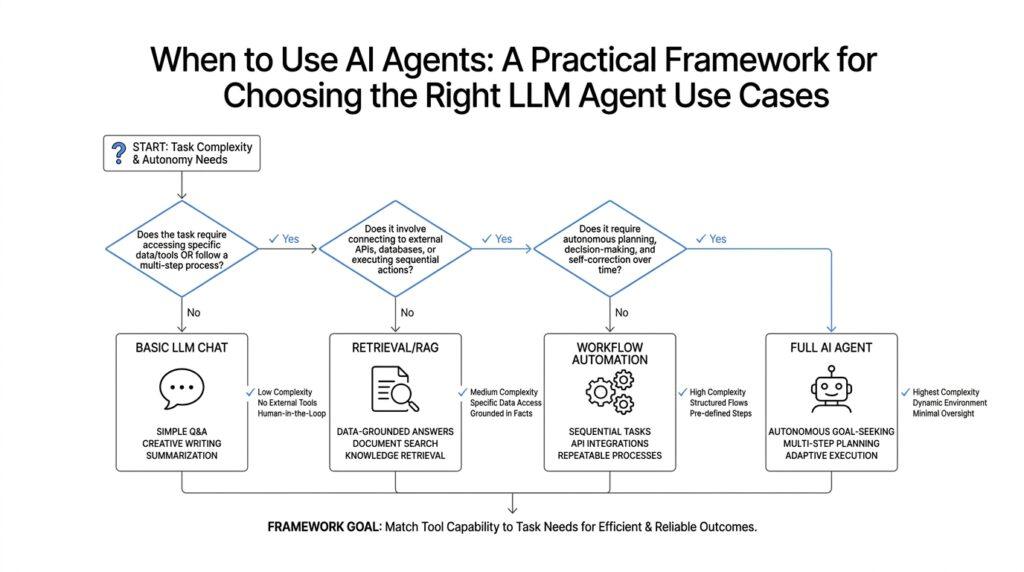
The easiest way to understand what agents do is to imagine a capable assistant standing at a desk with a list, a few tools, and a clear goal. You give it an objective like “find the best meeting time” or “draft a support reply from these notes,” and the agent does not stop at the first sentence it generates. It breaks the job into smaller steps, checks what it knows, looks up what it needs, and keeps going until it reaches a useful result. In practice, that means an AI agent is a system that can reason about a task, choose actions, and use external tools such as search, databases, calendars, or software APIs.
That word “actions” is the heart of the story. An action is anything the agent does beyond writing text, such as calling a function, reading a file, sending a message, or updating a record. This is where LLM agent use cases start to feel different from ordinary prompting, because the large language model (LLM, or large language model, meaning a system trained to predict and generate language) becomes the thinking layer inside a larger workflow. The model suggests what to do next, but the agent system carries out the step, checks the result, and decides whether another step is needed. What does an AI agent do that a chatbot does not? It can loop, observe, adjust, and continue until the task is complete.
A useful analogy is a road trip. A chatbot is like asking a friend for directions and then driving alone. An agent is more like riding with a navigator who watches the map, notices traffic, reroutes when needed, and keeps track of the destination while you move forward. That is why agents are so useful for tasks that have several dependencies, changing conditions, or repetitive decisions. They are less about a single brilliant answer and more about steady progress across a path that can get messy.
Another important piece is memory, which means the ability to keep track of relevant information across steps. Without memory, every new prompt is like starting a fresh conversation with someone who forgot the last five minutes. With memory, an agent can remember what it has already tried, what the user prefers, and what part of the task remains unfinished. That makes AI agents especially helpful in workflows like customer support triage, research assistance, content updates, and operations tasks where context from earlier steps changes what should happen next.
At the same time, agents are not magical employees who can handle everything on their own. They work best when the environment is structured enough for them to take useful steps and when the tools they rely on are reliable. If the task is a one-off question, a regular LLM response may be faster and clearer. If the task involves planning, checking, revising, and acting across multiple systems, an agent starts to earn its place.
So the simplest way to hold this in your mind is to think of an agent as a goal-driven worker: it receives an objective, plans a path, uses tools, reviews results, and continues until the job is done or it needs help. That picture will make the next decision much easier, because once we know what agents do, we can start asking when that extra machinery is worth the effort.
Identify Agent-Friendly Workflows
The easiest place to begin is with the work that already feels a little too messy for a normal chatbot. When we look for AI agent use cases, we are usually looking for workflows where the task is not one answer but a chain of actions: gather, check, decide, repeat. That is the moment an agent starts to make sense, because the job asks for movement through a process rather than a single clever response. If you are wondering, which workflows are actually friendly to agents? the short answer is: the ones with clear goals, repeatable steps, and enough context for the system to keep going without getting lost.
A good agent-friendly workflow usually has a recognizable shape, almost like a route we could draw on a map. We can think of it as a task that starts with an input, passes through a few decision points, and ends with a result that another person can review. Customer support triage is a classic example, because the agent can read a request, identify the issue, look up account details, and draft the right next action. Research assistance works the same way: the agent can search, compare sources, extract useful points, and organize them into something a human can refine. In both cases, the work fits LLM agent use cases because the model is not only generating text; it is helping move the workflow forward.
The next clue is repetition. If a team keeps doing the same kind of task over and over, that is often a sign the workflow may be agent-friendly. Repetition gives the agent a pattern to follow, and patterns are where automation becomes useful without becoming brittle. Think about updating records, routing requests, summarizing incoming messages, or checking whether a document meets a set of rules. These are not glamorous jobs, but they are exactly the sort of AI agent use cases where consistency matters more than creativity, and where a tool-using system can save time without needing to invent anything new.
Another strong signal is when the workflow depends on context from earlier steps. That is where memory, meaning the ability to carry relevant information forward, starts to matter. A hiring workflow, for example, may need to remember a candidate’s role, the stage of review, and the questions already answered before deciding what to do next. A content operations workflow may need to remember which draft was approved, which assets were missing, and which updates still need verification. When the agent has to hold the thread across multiple turns, AI agent use cases become much more compelling than a one-off prompt.
We also want to look for tasks that live inside a stable environment. This part matters because agents do best when the tools, rules, and destinations they touch behave in predictable ways. If the workflow depends on a calendar, a database, a ticketing system, or a document repository, and those systems have reliable interfaces, the agent can take meaningful steps with less confusion. But if the task is full of vague judgment calls, missing data, or constantly changing conditions, the agent may spend more time guessing than helping. In other words, the best workflows give the agent enough structure to act, but enough flexibility to handle small surprises.
A practical way to spot these opportunities is to follow the friction. Where do people spend time copying information, checking the same fields, or waiting for a next step that follows a predictable rule? That is often where AI agent use cases hide in plain sight. If the workflow feels like a relay race, with each handoff depending on the previous one, an agent may be able to carry the baton from one stage to the next. If the workflow is more like a single quick question, though, a regular LLM response may still be the better fit.
Once we start looking through this lens, the pattern becomes easier to see: agent-friendly workflows are not the fanciest ones, but the ones that are structured enough to guide action and repetitive enough to reward it. We are not searching for places where an agent can replace judgment entirely; we are looking for places where it can keep the work moving, one reliable step at a time. That distinction will help us decide where an agent belongs and where a simpler model still does the job beautifully.
Spot Complex Decision Points
Now that we have the workflow shape in mind, we can look for the moments where the path stops being straight. These are the complex decision points in AI agent use cases: the places where a task branches, pauses, or asks, “What should happen next?” A normal chatbot can answer a question, but an agent becomes valuable when it has to choose between options, weigh signals, and keep moving without losing the thread. If you have ever asked, when should an AI agent decide instead of only respond? this is the part of the journey where that answer starts to come into focus.
A complex decision point is any step where the next move depends on more than one piece of information. Think of it like standing at a trail split in the woods: you cannot just go forward blindly, because each direction leads somewhere different. In practice, this might mean routing a support ticket by urgency, choosing which source to trust in research, or deciding whether a document needs human review. These are strong signals for LLM agent use cases because the system must not only generate language, but also evaluate context and pick a path.
The easiest way to spot these moments is to watch for tradeoffs. A tradeoff means you have to balance two things that both matter, like speed versus accuracy, automation versus caution, or cost versus quality. If a workflow repeatedly asks the team to decide which option is “good enough” for the situation, an agent may help by applying the same logic every time. That is especially useful in AI agent use cases where the decision rules are clear enough to describe, even if the final answer still needs judgment.
Another clue is exception handling, which means dealing with the unusual cases that do not fit the normal pattern. A workflow may look simple on the surface, then suddenly ask what to do with missing data, conflicting answers, or a request that falls outside the usual process. These little surprises are often where people lose time, because they force a pause and a manual check. An agent can help here by recognizing the exception, gathering the missing detail, and either resolving it or passing it along with context.
We should also pay attention to decisions that depend on multiple checks in sequence. Sometimes the first question is not the real question; it only tells us what to ask next. For example, an agent might confirm whether a request is valid, then check whether the account is eligible, then decide whether to proceed, escalate, or ask for more information. This layered reasoning is a strong fit for AI agent use cases because the value comes from moving through the chain in order, not from producing a single polished sentence.
One practical test is to ask whether a human currently has to compare, filter, or prioritize before taking action. If the answer is yes, we may be looking at a decision point worth automating. A calendar assistant that picks the best meeting slot, an operations agent that routes work based on priority, or a sales support agent that scores incoming leads all rely on this kind of judgment. In each case, the agent is acting like a careful dispatcher, not a creative writer, which is why LLM agent use cases often show up in routing, triage, and review workflows.
The best complex decision points are the ones where the rules can be named, even if the outcome is not perfectly fixed. That matters because an agent needs structure to stay reliable. If we can explain the conditions, the inputs, and the fallback path, then the system has something solid to follow when the road forks. If we cannot describe the decision at all, the task may be too fuzzy for an agent and better suited to a human from the start.
So when you look at a workflow and see branching choices, repeated tradeoffs, or messy exceptions, you are probably staring at a place where an AI agent can add real value. The goal is not to hand over every judgment call; it is to find the ones that slow the work down because they appear again and again. Once you can spot those turning points, the next step is learning how much autonomy to give the agent without letting it wander.
Check Data and Tool Access
Once we know a workflow has enough shape to deserve an agent, the next question gets more practical: can the agent actually reach the information and tools it needs? This is where many promising AI agent use cases slow down, not because the idea is bad, but because the environment is closed off, incomplete, or too messy to trust. Before we imagine a helpful digital worker, we have to check whether it can open the right drawers, read the right files, and use the right systems. That is why LLM agent use cases live or die on data access and tool access.
Think of it like giving someone a job in a workshop. It does not matter how capable the person is if the tools are locked away or the instruction sheet is missing half its pages. An agent needs two things to do real work: data, which is the information it reads, and tools, which are the actions it can take through software. A tool can be a search function, a calendar, a database, a ticketing system, or an email app, and a database is simply an organized store of information. If either piece is missing, the agent may still talk well, but it will not move the task forward.
The first check is whether the data exists in a form the agent can actually use. Some information lives in neat tables, forms, or fields, which we call structured data, meaning data arranged in a predictable layout. Other information hides in long documents, screenshots, or free-form messages, which is unstructured data, meaning information without a fixed shape. AI agent use cases are much easier when the core facts are structured, because the agent can read them consistently instead of guessing where they are buried. When the data is scattered across notes, PDFs, and chats, we may need extra cleanup before the agent can rely on it.
The next question is whether the agent can reach the system through a clean connection. This is where an API, or application programming interface, comes in, which is a standard way for software to talk to other software. If a calendar app, CRM, or internal platform has an API, the agent can ask for information or trigger an action in a controlled way. If it does not, people may end up copying and pasting between systems, which weakens the case for automation and makes LLM agent use cases much harder to maintain.
We also need to look at permissions, which are the rules that decide what the agent can read or change. This part matters more than it first appears, because an agent that can see too little will make poor decisions, while an agent that can change too much can create real risk. A helpful question is: what would this agent need in order to finish the task, and what would be dangerous for it to touch? When we answer that clearly, we can design safe limits instead of hoping for the best.
Another useful check is data quality. If the source information is outdated, inconsistent, or full of gaps, the agent will inherit those problems and may act with confidence in the wrong direction. That is why some AI agent use cases work beautifully in one team and fail in another: the system is only as reliable as the records it reads. A good rule of thumb is to ask whether a human would trust the same data enough to act on it without double-checking. If the answer is no, the agent probably should not be the first decision-maker either.
It also helps to ask whether the tool chain is stable enough for repeated use. A stable tool is one that behaves predictably, with clear inputs and clear outputs, instead of changing format every week or depending on hidden manual steps. When the tools are reliable, the agent can follow a path, verify the result, and continue. When the tools are brittle, even strong AI agent use cases become frustrating, because the agent spends more time recovering from breakage than completing the job.
So the real test is not whether an agent sounds capable in theory. The real test is whether it can see the right data, reach the right tools, and operate inside the right permissions without needing a human to rescue every step. If those pieces are in place, the workflow starts to look much more ready for automation. And once we know the data and tool access are solid, we can move on to the next question: how much control should the agent have when it starts acting on its own?
Define Guardrails and Oversight
Now that the agent can move through a workflow, we need the part that keeps it from wandering off the path. In AI agent use cases, guardrails are the boundaries that tell the agent what it may see, say, and do, while oversight is the human or system review that watches the work and steps in when needed. If you have ever asked, what are guardrails for AI agents?, think of them like the rails on a bridge: they do not drive the car for you, but they keep the journey inside a safe lane. That matters because once an agent can act, we are no longer only shaping answers; we are shaping outcomes.
The simplest guardrails are the ones that draw a clear fence around the job. A guardrail is a rule that limits behavior, such as only using approved tools, staying within a spending cap, or avoiding certain kinds of data. In LLM agent use cases, these boundaries help the model stay useful without letting it reach for everything at once. If an agent can summarize customer messages but cannot send refunds, edit records, or access private files unless it is allowed, we have already reduced a lot of risk. The goal is not to make the agent timid; it is to make it predictable.
It helps to think about guardrails in layers, because each layer protects a different part of the workflow. Input guardrails filter what comes into the agent, such as blocking sensitive information or malformed requests. Action guardrails control what the agent can do next, like limiting which systems it can touch or requiring approval before it changes anything. Output guardrails shape what leaves the system, making sure the response is accurate, polite, and within policy. When these layers work together, AI agent use cases become easier to trust because the agent is not making every decision in an open field.
Oversight is the companion piece, and it answers a different question: who is watching? In some workflows, oversight means human-in-the-loop, which is a person who reviews the agent’s plan or output before anything goes out. In other workflows, it means human-on-the-loop, which is a person who monitors the agent while it works and can stop it if something looks wrong. Both approaches matter because not every task deserves the same amount of supervision. A support draft may only need a quick review, while a payment-related action may need a person to approve every step.
This is where the risk level of the task starts to matter. If a mistake would only waste a few minutes, the guardrails can be lighter and the oversight can be occasional. If a mistake could cost money, damage trust, or create a safety problem, the guardrails need to be tighter and the oversight more active. That is why the best LLM agent use cases are not the ones with the most freedom; they are the ones with the right amount of freedom. We are trying to match control to consequence, not to show off how autonomous the system can be.
A practical way to set this up is to ask what the worst reasonable failure would look like. If an agent guesses wrong, who notices, how quickly can they intervene, and what is the fallback? Those questions help us decide whether the agent should act automatically, ask for confirmation, or hand the task back to a human. In real AI agent use cases, that mix of permission and review often matters more than the model itself, because the system only earns trust when people can see where the boundaries are.
So when we define guardrails and oversight, we are really designing the shape of responsibility. The agent gets room to move, but not room to surprise us in costly ways, and people stay involved at the points where judgment matters most. That balance is what lets an agent be helpful without becoming reckless, and it is the bridge between a clever prototype and a system we can rely on day after day.
Pilot, Measure, and Refine
Once the workflow looks ready and the guardrails are in place, the next move is not to roll it out everywhere. The smarter path is to start with a pilot, which means a small, controlled test in one real workflow with real people watching closely. This is where AI agent use cases either begin to prove themselves or reveal where they still need work. If you have been wondering, how do we know an AI agent is actually helping? the answer starts here: we measure the pilot before we trust the pattern.
A good pilot feels modest on purpose. We pick one narrow task, one team, or one customer segment, and we give the agent a job that is useful but not mission-critical. That keeps the stakes low while still showing us how the agent behaves in the wild, where inputs are messy and edge cases appear without warning. In LLM agent use cases, this stage matters because the model may look impressive in a demo yet stumble when it meets real data, real timing, and real expectations. The pilot turns theory into something we can observe.
Before the pilot starts, we need a baseline, which is the current way the work gets done without the agent. A baseline gives us something to compare against, like a before-and-after photo taken from the same angle. We might measure how long the task takes, how often it needs rework, how many cases get escalated, or how satisfied the people involved feel with the result. Those numbers do not have to be perfect, but they do need to be clear enough that we can tell whether the AI agent use cases are saving time, reducing friction, or quietly adding more of both.
The best measurements mix hard numbers with human judgment. Hard numbers are things we can count, such as completion time, accuracy, deflection rate, or the number of manual corrections. Human judgment captures the parts that numbers miss, like whether the output feels trustworthy, whether the handoff is smooth, or whether the agent’s suggestions fit the workflow. That combination helps us avoid a common trap in LLM agent use cases: a system may look efficient on paper while still creating confusion for the people who have to live with it.
As the pilot runs, we watch for patterns instead of isolated mistakes. One error may be a fluke, but repeated failure usually points to a real design problem in the prompt, the tools, the data, or the guardrails. Maybe the agent needs a clearer instruction, a better fallback path, or a tighter rule about when to ask for help. Maybe it is trying to do too much too soon. When we measure carefully, we stop guessing and start seeing which part of the workflow needs to change.
That is where refinement begins. Refining means we adjust the system based on what the pilot taught us, then test again. We may trim unnecessary steps, strengthen prompts, improve the information the agent receives, or change when a human review is required. This back-and-forth is normal, and it is one of the most important parts of AI agent use cases because a useful agent usually emerges through iteration, not from a single first draft.
Refinement also helps us separate genuine value from clever automation theater. If the agent only works when everything is perfect, it is probably too fragile for daily use. If it becomes more reliable after each round of feedback, we are moving in the right direction. The real question is not whether the system works once, but whether it keeps working as the workflow gets a little more complicated, a little more busy, and a little more real. That is the moment when LLM agent use cases stop being experiments and start becoming dependable parts of the job.
So we move in a steady rhythm: pilot in a small space, measure what happened, refine what we learned, then repeat. That rhythm keeps the project grounded and gives the team a clear way to decide whether the agent deserves a bigger role. It also sets up the next step naturally, because once the results are visible, we can talk about how to expand the right use cases without losing control.



