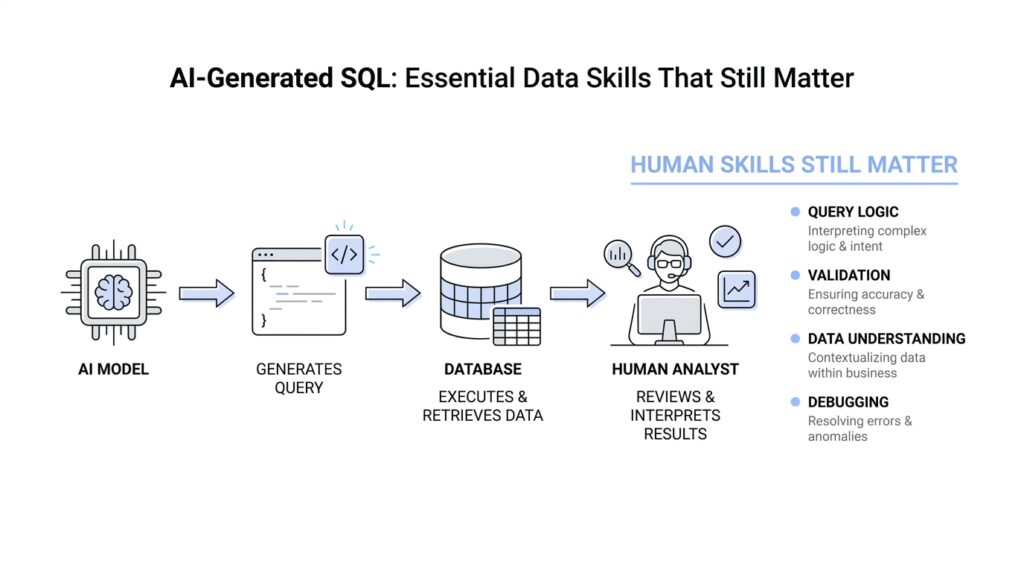
Start With Clear Business Questions
Before we ask AI to write SQL, we need to know what answer we actually want. That sounds obvious, but in practice it is the step that saves the most time, because AI-generated SQL is only as useful as the business question behind it. If the question is fuzzy, the query will be fuzzy too, and you can end up with a polished answer to the wrong problem. So the first skill that still matters is not typing faster; it is learning how to ask a clear question.
Imagine you walk into a store and say, “How are we doing?” A helpful person would have to stop and ask, “Compared with what, and for which part of the business?” That is the same moment we hit in data work. A business question needs shape before it can become SQL, and shape means knowing the metric, the audience, the time frame, and the decision it will support. Without that structure, even the best AI-generated SQL is guessing in the dark.
This is why the most useful habit is to translate vague curiosity into a measurable question. Instead of asking whether customers are “active,” we ask how many customers placed an order in the last 30 days. Instead of asking whether sales are “up,” we ask how revenue this month compares with the same month last year. Those refinements matter because SQL works with precise conditions, not feelings, and AI does better when we give it a question that already has clean edges.
What business question should I ask before generating SQL? A good one sounds specific enough that two people would answer it the same way. We want to know what counts as a customer, what counts as an order, whether refunds should be included, and whether the report should use calendar months or rolling periods. These details may feel small, but they are the hinges on which the whole query turns. If we skip them, the result can look right while quietly measuring the wrong thing.
There is also a deeper reason to slow down here: business questions often hide assumptions. When someone says, “Show me our top customers,” we still need to define top by revenue, order count, or lifetime value, because each version tells a different story. When someone asks for churn, we need to know whether churn means no purchase in 60 days, no login in 30 days, or a canceled subscription. AI-generated SQL can draft the logic, but it cannot know which business meaning you intended unless you spell it out first.
That is where skilled data thinking still shines. You become the person who turns a loose request into a reliable measurement plan, and that plan becomes the prompt, the SQL, and finally the answer. The better you define the question, the less time you spend fixing the query later, and the more confidence your team has in the result. In other words, clear business questions are not extra work; they are the foundation that makes AI-generated SQL actually useful.
So when a request lands on your desk, pause before opening the editor and ask the human version of the problem first. What decision will this support? What exactly are we counting, comparing, or tracking? Once we can answer those questions in plain language, the SQL becomes a translation exercise instead of a guessing game, and that is where the real speed starts to show.
Provide Schema And Context
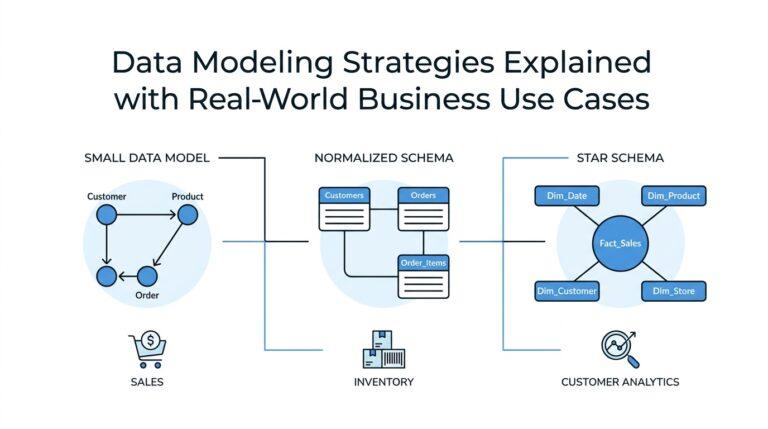
When we move from the business question to the actual query, the next thing AI needs is the map of the place. That map is the schema: the structure of the database, including the tables, columns, and how the objects are organized so their names do not clash with one another. Think of it like a floor plan before you start moving furniture; without it, AI-generated SQL can still write something that looks confident, but it may not know where the data lives or how the rooms connect.
This is why “Provide schema and context” matters so much in AI-generated SQL. If we tell the model that orders has an order_id, a customer_id, and an order_date, we are giving it the ingredients it needs to build a reliable query instead of inventing one from memory. The same goes for data types, which are the rules that say whether a column holds text, numbers, dates, or something else, because those rules shape how the query can filter, join, and calculate correctly. Primary keys, which uniquely identify rows, and foreign keys, which link one table to another, are especially valuable because they show AI how the tables relate in real life.
If you have ever wondered, “What schema should I provide AI to generate SQL?”, the safest answer is: the smallest complete picture that explains the tables involved and how they connect. That usually means the table names, the important columns, the primary key for each table, the foreign key relationships, and any column names that might be easy to confuse, such as created_at versus updated_at or revenue versus net_revenue. In a relational database, those details are not decoration; they are the difference between a query that joins the right rows and a query that quietly mixes unrelated data.
The good news is that we do not have to guess the schema from memory. Most SQL systems expose metadata through an information schema, which is a portable set of views that describe database objects like tables, columns, and constraints. In PostgreSQL, for example, the information schema is defined by the SQL standard and is meant to stay stable across systems, which makes it a useful place to inspect table structure before we ask AI to write anything. That is the quiet superpower here: when we verify the structure first, we give the model facts instead of folklore.
Context is the other half of the story, and it is the half that beginners often underestimate. Schema tells AI what exists; context tells it what matters. When we say a table contains status, we still need to explain whether canceled orders count, whether refunded orders should be excluded, whether dates should use the customer’s timezone or the warehouse’s timezone, and what level of detail we want the result to describe. Those choices are part of the data context, and they keep AI-generated SQL from producing a technically correct answer to the wrong business situation.
A useful prompt, then, sounds less like a command and more like a guided briefing. We might say: Use the orders and customers tables. Orders has order_id as the primary key and customer_id as a foreign key to customers. Return monthly revenue for completed orders only, excluding refunds, grouped by calendar month. That kind of prompt gives the model the schema, the join path, the filters, and the reporting frame all at once, so the AI can focus on drafting the SQL instead of filling in missing assumptions. Once we start thinking this way, AI-generated SQL becomes more dependable, because we are no longer asking it to read our minds; we are handing it the shape of the data and the meaning behind it.
Prompt For Specific SQL Output
Once we have the business question and the schema, the next step is to tell AI what the finished answer should look like. This is where a strong SQL prompt starts to feel less like a vague request and more like a design brief for the result set, which is the rows and columns a query returns. If we do not describe the output clearly, AI-generated SQL may still run, but it can return the wrong level of detail, the wrong columns, or a shape that does not fit the report we had in mind.
That is why specificity matters so much here. We are not only asking for data; we are asking for a particular form of data. For example, there is a big difference between “show monthly revenue” and “show one row per calendar month with month_start, total_revenue, and order_count.” The first request leaves room for guesswork, while the second gives the model a clear target, which is exactly what we want when we ask AI to generate SQL.
A good way to think about this is to picture a finished table on your screen before the query is even written. What columns should appear first? Should the result be grouped by customer, by day, or by region? Should the numbers be totals, averages, or counts? When you answer those questions in the prompt, you are helping the model choose the right aggregation, which is the way SQL combines many rows into a smaller summary.
This is also the moment to say how precise the output should be. If you want one row per customer, say that plainly; if you want one row per customer per month, say that too, because those two shapes tell very different stories. This is one of the most common mistakes people make when asking for AI-generated SQL: they describe the analysis they want, but not the grain, which is the level of detail each row represents. Once the grain is clear, the rest of the query has something solid to stand on.
What should I include in a SQL prompt to get the right columns? A useful prompt names the exact fields you want returned, the order you want them in, and any labels you want the model to use. For instance, you might ask for customer_id, customer_name, lifetime_revenue, and last_order_date, instead of leaving the AI to decide whether to include internal IDs, email addresses, or extra helper columns. That small act of naming the output can save a lot of cleanup later, because the query becomes easier to read and easier to use.
Formatting details matter too, even though they can feel minor at first. If dates should appear as month names, say so; if currency should stay numeric for later analysis, say that instead of asking for a formatted string with dollar signs. If null values, which are missing values in a column, should become zeroes or remain blank, spell that out as well. These choices shape the output just as much as the joins and filters do, and AI-generated SQL improves when we treat them as part of the request rather than afterthoughts.
Ordering and filtering are the quiet finishing touches that often separate a useful query from a frustrating one. We may want the largest values first, the most recent dates first, or a fixed top 10 list, and each version tells a different story. We may also want to exclude incomplete records, test data, or rows that would distort the final answer, because a clean result set is easier to trust. When we state those rules up front, the model has fewer chances to make a technically valid but practically awkward choice.
The best prompts often include a tiny sample of the shape we expect, even if we are not providing real data. That sample acts like a sketch on a napkin: it shows the model the destination without forcing it to guess the route. In practice, this means we describe the output columns, the grouping level, the sorting rule, and any special formatting all in the same prompt. Once we start prompting for specific SQL output this way, AI-generated SQL becomes less of a guessing game and more of a translation from business intent into a table we can actually use.
Validate Results Against Source Data
Once the SQL is drafted, the real work begins: we check whether the answer matches the source data, not whether the query merely runs. That is the moment where AI-generated SQL either earns our trust or reveals a quiet mistake, and the fastest way to think about it is to ask, “How do we validate AI-generated SQL results against source data?” We compare the output to the tables it came from, the same way we would compare a copy of a map to the terrain itself. When the two disagree, we do not guess—we trace the difference back to the row level and find out where the story changed. ⠀cite⠂turn1search2⠂turn0search0⠁
A good place to start is with the simplest checks: counts and totals. PostgreSQL’s documentation notes that COUNT(*) returns the total number of input rows, while COUNT(column) counts only the non-null values in that column, and SUM ignores null inputs. That means a validation query should use the same measure the business question asked for, because COUNT(*), COUNT(customer_id), and SUM(amount) are not interchangeable tests. If we choose the wrong aggregate, we can make AI-generated SQL look correct while checking the wrong thing. ⠀cite⠂turn1search2⠂turn1search6⠁
From there, we move from totals to individual records. This is where we ask whether the rows in the result can be traced back to real rows in the source tables, one by one or in a small sample. A handful of spot checks often reveals what a large summary can hide, especially when the query groups data by month, customer, or region. If a number looks surprising, we pick a few example keys, follow them back through the source data, and see whether the AI-generated SQL included the right rows, excluded the wrong ones, or grouped details at the wrong grain. That slow, careful walk is often what separates a confident-looking answer from a trustworthy one.
When we want a stronger comparison, set operations give us a clean way to let SQL do the arguing for us. PostgreSQL documents that EXCEPT returns rows that appear in the first query but not the second, and it also requires the two queries to return the same number of columns with compatible data types. That makes it useful for validation, because we can place a trusted reference query beside the AI-generated SQL and ask the database to show us what is missing or extra. In practice, this feels a lot like holding two transparencies up to the light and looking for the places where they do not overlap. ⠀cite⠂turn0search0⠁
We also need to watch for the quiet traps that make results look reasonable when they are not. Null handling is one of them, because aggregate functions generally ignore null inputs, so a missing value can disappear from a summary unless we check for it on purpose. Another trap is assuming that a summary proves correctness when it only proves arithmetic consistency; the numbers may add up even if the underlying rows are wrong. That is why validation works best as a sequence: compare totals first, then inspect samples, then diff the result set against a reference query, and only then decide whether the AI-generated SQL is ready to use. ⠀cite⠂turn1search2⠂turn1search6⠂turn0search0⠁
The habit we are building here is not suspicion for its own sake; it is disciplined confidence. When we validate against source data, we teach ourselves to notice whether a query is faithful to the business question, the schema, and the rows underneath it. That is the skill that keeps AI-generated SQL useful after the excitement of generation wears off, because the final answer still has to survive contact with the real data. Once that becomes part of the workflow, we can move through the rest of the analysis with much steadier footing.
Tune Performance And Readability
Now that the query matches the business question and survives validation, we enter a quieter but very practical stage: making AI-generated SQL pleasant to read and efficient to run. This is where the database stops being a black box and starts feeling more like a workshop, with tools laid out in a sensible order. If you have ever wondered, “How do you tune AI-generated SQL for performance and readability?”, the answer is that we shape the query so the database can work less and a human can understand more. Those two goals sound different, but they often support each other.
Readability matters because SQL rarely belongs to one person for long. A query that looks neat today may be revisited by a teammate, pasted into a dashboard, or used as the starting point for a later analysis. When we ask AI-generated SQL to format itself clearly, we are asking for line breaks, consistent aliases, and names that describe the business meaning instead of the raw table structure. An alias is a short label we give a table or column inside a query, and it becomes the handrail that helps us follow the logic without getting lost.
Performance tuning begins with a simple habit: do less work sooner. If a query only needs completed orders from the last 90 days, we want those filters to appear early so the database can shrink the dataset before it starts grouping or joining. A join is the step where SQL combines rows from two tables based on a shared column, and joins get expensive when they compare more rows than necessary. AI-generated SQL often writes the right answer in a general way, but we can make it faster by narrowing the path, trimming unused columns, and avoiding calculations on every row when a filter can do the job instead.
This is also where indexes enter the story. An index is a separate data structure that helps the database find rows faster, much like the index at the back of a book helps us jump to the right page. If a query filters on order_date or customer_id all the time, those columns often deserve special attention because the database may be able to locate matching rows without scanning the entire table. The key idea is not to chase indexes blindly, but to notice which filters and joins appear again and again in AI-generated SQL and then check whether the schema supports them well.
Readability and performance can pull in different directions, so we need to balance them with care. A common temptation is to pack everything into one dense statement, but a query that hides the logic under layers of nested expressions becomes hard to debug, especially when AI-generated SQL returns something unexpected. On the other hand, breaking a query into clear stages can make each step easier to inspect, as long as we do not create unnecessary detours for the database. The healthiest pattern is often a query that reads like a short story: filter, join, aggregate, and sort, with each step doing one visible job.
That balance gets even more important when we use common table expressions, or CTEs, which are named subqueries that help us organize complex logic into smaller pieces. A CTE can make AI-generated SQL far easier to follow because it gives each stage a meaningful name, like filtered_orders or monthly_revenue. At the same time, we still need to check the execution plan, which is the database’s description of how it intends to run the query, because a beautiful structure on the page does not always mean the fastest route under the hood. The query should read cleanly for us and behave sensibly for the engine.
One of the most practical habits is to ask the AI for SQL that is already easy to inspect. We can request explicit column names, stable ordering, and comments that explain any non-obvious logic, especially when the query uses a tricky date boundary or a careful exclusion rule. We can also ask for readable formatting, because a well-spaced query makes it much easier to spot accidental duplicates, missing filters, or a join that points to the wrong table. In AI-generated SQL, clarity is not decoration; it is part of the quality control process.
As we keep tuning, the goal is not to make every query shorter or every clause fancier. The goal is to leave behind SQL that another person can trust, extend, and run without fear of hidden waste. When AI-generated SQL is both readable and performance-aware, it stops feeling like a rough draft and starts feeling like a reliable working file. That is the point where we can move forward with confidence, because the query is no longer only correct—it is also shaped for real-world use.
Secure Access And Sensitive Fields
The moment a query starts touching salaries, emails, account numbers, or health details, the work changes. AI-generated SQL can still draft the logic, but we now care about who can see the result, not only whether the result is correct. That is why secure access and sensitive fields are part of the craft: we want the right answer to reach the right people, and nobody else. In practice, the safest path is to narrow what the model can see before we ever run the query.
This is where least privilege becomes more than a security slogan. PostgreSQL does not grant table, column, or schema privileges to PUBLIC by default for tables and columns, and the GRANT system lets us give access at the table level or down to specific columns. That means we can let someone read the business fields they need without opening every door in the database at once. When AI-generated SQL is built on top of that smaller permission set, it has less room to wander into sensitive territory.
A helpful habit is to think about what the database will reveal before we think about what the query will calculate. PostgreSQL’s information_schema.columns view shows only the columns the current user can access, which makes it a practical way to inspect the shape of the data from the same perspective the query will use. If a field should stay private, it should stay out of the prompt, out of the view, or out of the role that runs the SQL. That is often the cleanest answer to the question, “How do I protect sensitive fields when AI writes SQL?”
Row-level security gives us the next layer of control when the problem is not the column, but the row. PostgreSQL’s row security policies restrict which rows a user can return or modify, and when row security is enabled without a matching policy, access is denied by default. That default-deny shape is useful because it turns access into an explicit decision instead of an accident. The important wrinkle is that table owners usually bypass these policies, and superusers or roles with BYPASSRLS also skip them, so we still need to know which role is actually running the AI-generated SQL.
Views help us create a safer face for the data, especially when we want to hide sensitive fields behind a narrower surface. PostgreSQL notes that views can hide the contents of certain columns, but they cannot reliably hide rows unless the view uses the security_barrier option. A security barrier view forces the view’s own filters to run before user-supplied conditions that might otherwise leak information, though PostgreSQL also warns that this protection can reduce performance. In other words, we trade a little speed for a lot more confidence when the data is sensitive.
That detail matters when AI-generated SQL starts adding its own conditions. A clever-looking filter can accidentally become a side channel if the planner evaluates it too early, which is why PostgreSQL treats leakproof functions and security barriers as part of the safety story. The practical lesson is simple: if a field is sensitive, do not hand the model the raw table and hope for the best. Give it a role, a view, or a policy that already encodes the boundary you want.
So when we ask the database to produce a report, we should also ask it to protect the people in the report. We can feed AI the safe objects only, keep sensitive columns out of the prompt, and use the same access path that the end user will actually have. That way, AI-generated SQL becomes a helper inside the fence, not a shortcut around it. And once access is locked down, we can move on with far less worry that a perfectly valid query is also a dangerous one.