What Is a Covering Index?
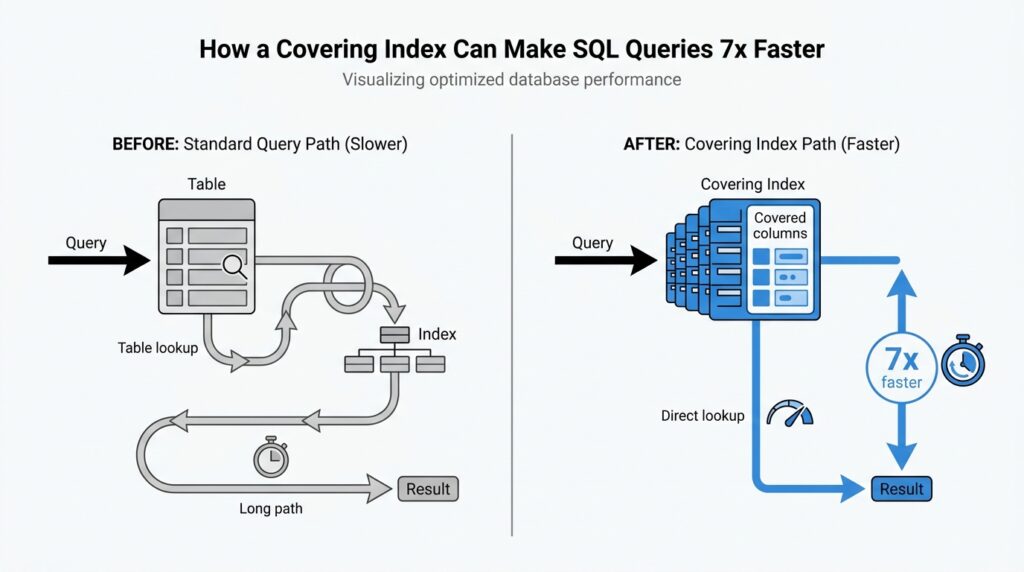
When you hear covering index, think of an index that carries enough information to answer a query without going back to the table. In plain language, a covering index is an index that contains every column the query needs, so the database can satisfy the request from the index alone. What is a covering index in SQL, then? It is the shortcut that lets the engine find the right rows and return the right values in one pass instead of making an extra trip.
That extra trip is the part that usually costs time. In a normal index scan, the database finds matching entries in the index and then follows them back to the table to fetch whatever columns are still missing; PostgreSQL describes this as needing both the index and the heap, while SQLite says a covering index avoids consulting the original table at all. With a covering index, the data you asked for is already sitting in the index entry, so the engine can perform an index-only scan and finish the job right there.
A good way to picture it is a library card catalog. A regular index is like a card that tells you which shelf holds the book, but you still have to walk to the shelf and open the book to read the page you want. A covering index is more like a card that also includes the exact paragraph you need, so you can leave the shelf alone. That is why covering indexes shine on large tables: they cut down the back-and-forth between the index and the table, which is especially helpful when that table data lives far apart on disk.
Here is the part that makes the idea feel concrete. Suppose a query filters by customer_id and returns order_date and total_amount; if your index includes those columns, the database can use the index to find the matching orders and also read the output columns from the same structure. But if the query asks for shipping_address and that column is not in the index, the index no longer covers the query, and the engine has to go back to the table for the missing piece. That is the whole test: if every column the query touches is already in the index, the index is covering that query.
This is why the best covering index is usually built around a real, repeated query rather than around every column in the table. PostgreSQL’s documentation notes that covering indexes are meant for expensive, frequently run queries whose select list can be satisfied from the index, and MySQL describes the same idea as retrieving values without consulting the data rows. So the mental model is simple: a covering index is not a magic faster index in the abstract; it is a carefully chosen index that already contains the answers your query is asking for.
Find the Slow Query
Before we reach for a new index, we need to find the query that is actually dragging the system down. That search matters because a covering index helps most when it supports a real, repeated query pattern, not a vague guess about which table feels heavy. So our first job is to identify the statement that is slow, frequent, and worth improving, then read its shape closely enough to see whether the index can answer it without extra table work.
If you are wondering, “Which query should I optimize first?”, start with the ones that show up again and again in your database’s performance data. PostgreSQL’s pg_stat_statements module keeps planning and execution statistics for SQL statements, including how many times each statement ran and how much total execution time it consumed, which makes it easier to spot the queries that quietly eat the most time across the day. MySQL takes a similar approach with the slow query log, which records statements that run longer than long_query_time and examine at least min_examined_row_limit rows.
That is the first clue: look for the query that is both slow and common. A one-off query that takes a second may be annoying, but a query that takes a little too long and runs thousands of times can cost far more by the end of the day. PostgreSQL’s statistics view is useful here because it lets you compare calls against total_exec_time, while MySQL’s slow query log can be summarized with mysqldumpslow so the same expensive statement does not hide inside a long list of nearly identical entries.
Once we have a candidate, we read its execution plan like a map. PostgreSQL’s EXPLAIN shows the plan the optimizer chose, and EXPLAIN ANALYZE adds actual execution timing; MySQL’s EXPLAIN shows how the server would execute the statement, including join order and table access choices. What we are watching for is extra work that hints at unnecessary table lookups, such as a plan that scans an index and then keeps visiting the table for missing columns, because that is exactly the kind of detour a covering index can remove.
This is where the slow query and the covering index start talking to each other. If the query filters on a small set of columns and returns only a few more, we ask whether those output columns can live in the same index as the search columns. PostgreSQL says an index-only scan is possible only when all columns needed by the query are available from the index, and SQLite explains the same idea in plainer language: when all needed data is in the covering index, the engine does not need to consult the original table. In practice, that means we are not hunting for a magical index; we are matching one exact query shape to one exact index shape.
The slow query usually reveals itself in a familiar pattern. It is the report that runs every minute, the dashboard query that lands on every page load, or the lookup that feels harmless until it repeats by the thousands. PostgreSQL’s statistics and MySQL’s slow log both help us separate the noisy outliers from the real candidates, and the execution plan tells us whether the query is spending time on avoidable table access. Once we see that pattern clearly, we are ready for the next step: shaping an index around the columns that query keeps asking for.
Pick the Right Columns
Now that we know which query is slowing us down, the next question feels a lot like packing for a trip: which columns actually need to come along? A good covering index only works when it carries the columns the query truly uses, so we want to choose the smallest set that still lets the database answer the request without reaching back to the table. PostgreSQL describes this as including the columns needed by a frequently run query, and SQLite says a covering index is one that contains all the data the query needs.
We usually start with the columns in the WHERE clause, because those are the filters that help the engine find the right rows in the first place. If a query says WHERE customer_id = ? AND order_date >= ?, those are the columns that belong at the front of the index, since MySQL can use the leftmost prefix of a multi-column index and SQLite says multi-column indexes are strongest when they cover the AND-connected search terms. In other words, the search columns are the doorway; without them, the covering index never gets the chance to help.
Then we look at ordering. If the query also asks for ORDER BY or GROUP BY, those columns are often the next pieces to consider, because the right index can let the database read rows in the order we want instead of sorting them afterward. SQLite shows this clearly with a two-column index where the first column narrows the search and the next column supplies the sort order, and MySQL notes that sorting or grouping can use a leftmost prefix of a usable index. So if you have a query like “find orders for one customer, then list them by date,” the index should usually reflect that story in the same order.
Only after that do we add the output columns, the ones that appear in the SELECT list. These are the extra pieces that turn a useful index into a covering index, because the database can return the result directly from the index instead of visiting the table again. PostgreSQL recommends using INCLUDE for these payload columns, and MySQL calls an index covering when the query uses only columns that already live in a single index. That is the moment when the shape of the query and the shape of the index finally match.
But here is the part that saves us from overpacking: more columns are not always better. PostgreSQL warns that wide payload columns bloat the index, can make searches slower, and may even exceed the index size limit, while also pointing out that payload columns are only worthwhile when the table changes slowly enough that the engine can often stay out of the heap. That means we should be selective with a covering index and resist the temptation to throw in every column the table happens to have.
So when we ask, “Which columns should we pick?”, the answer is: the ones that match the query’s job, in that order. First come the filters, then the sort columns if the query needs them, and finally the few returned columns that let the database finish the work from the index alone. If every column the query touches is already in that structure, we have built a covering index that can do its job cleanly, without extra table trips.
Create the Covering Index
Now that we know the query shape, we can turn it into an index that can actually carry its own weight. What does a covering index look like in SQL? It looks like a column list arranged so the database can find the rows, return the requested values, and avoid the extra trip back to the table whenever possible. PostgreSQL calls this an index-only scan, MySQL describes it as retrieving values without consulting the data rows, and SQLite says the covering index contains all the information the query needs.
In PostgreSQL, the cleanest way to build that shape is to keep the search columns in the index key and place the returned columns in an INCLUDE list. If we commonly run a query like SELECT total_amount FROM orders WHERE customer_id = ? AND order_date >= ?, a matching index might look like this:
CREATE INDEX orders_customer_date_amount
ON orders (customer_id, order_date)
INCLUDE (total_amount);
Here, customer_id and order_date help the engine find the rows, while total_amount rides along as payload so the query can be answered from the index alone. PostgreSQL documents that INCLUDE columns are not part of the search key, and that they do not affect uniqueness the way key columns do.
In MySQL and SQLite, the idea is the same, but the syntax is a little more direct because the extra output columns usually live in the index definition itself. If the query needs customer_id, order_date, and total_amount, the index can simply include all three columns in the order the query uses them:
CREATE INDEX orders_customer_date_amount
ON orders (customer_id, order_date, total_amount);
MySQL explains that a query can be covered when every selected column is already present in some index, and SQLite shows the same pattern with an index whose extra trailing column lets it avoid consulting the original table. That is the small-but-important shift from a normal index to a covering index.
The order of those columns matters because the index should match the story your query is telling. The columns in the WHERE clause usually come first, because MySQL can use the leftmost prefix of a multi-column index, and SQLite’s planner is also built around multi-column searches that hinge on AND-connected conditions. If the query also sorts by a column, placing that column next can help the engine satisfy the order without building a temporary sort structure.
This is also the moment to stay disciplined. A covering index is powerful, but it gets heavier every time we add a wide column, and PostgreSQL warns that extra payload columns bloat the index and can even push it past the index-size limit. So we want the smallest set that still covers the real query, not a “just in case” bundle of everything the table contains. In practice, that means we keep the filter columns, add the sort columns only when they matter, and include only the output columns the query truly needs.
Once the index exists, we do not trust our hopes; we check the plan. PostgreSQL recommends using EXPLAIN and EXPLAIN ANALYZE to inspect real query behavior, and SQLite’s EXPLAIN QUERY PLAN will even show when a covering index is being used. If the plan says the engine can answer from the index alone, we have built the right covering index; if not, the column order or column list probably needs another careful pass.
Check the Execution Plan
When the new index is in place, this is the moment we stop guessing and start reading the database’s map. If you’re asking, “How do I know my covering index is really being used?”, the answer lives in the execution plan, because that plan shows whether the engine is scanning an index, visiting the table, or finishing the job from the index alone. PostgreSQL’s EXPLAIN displays the plan the planner chose, and EXPLAIN ANALYZE runs the statement and adds actual timing and row counts so we can see reality, not just a prediction.
In PostgreSQL, the most encouraging sign is an Index Only Scan, because that means the query can be answered from the index without ordinary heap access when the visibility map cooperates. That last part matters more than many beginners expect: PostgreSQL still checks the visibility map, and if the page is not marked all-visible, it may fall back to visiting the heap, which weakens the gain. So when you run EXPLAIN ANALYZE, we look not only for the scan type but also for Heap Fetches; a true win usually shows a very low number there, often zero on stable, rarely changing data.
MySQL tells the same story in a different accent. In EXPLAIN, the Extra column may show Using index, which means MySQL can retrieve the column information from the index tree without an extra seek to the actual row, and the manual says this happens when the query uses only columns from a single index. The same documentation also notes that, for InnoDB, a secondary index can cover the selected columns even when the primary key is part of the request, because InnoDB stores the primary key value with each secondary index. When you see Using index, you are looking at the sign that the covering index is doing real work.
SQLite makes the clue especially easy to spot. Its EXPLAIN QUERY PLAN output explicitly says whether the covering index optimization applies, and when it does, the detail line includes USING COVERING INDEX. That little phrase is the cleanest possible confirmation that the query can be served without consulting the original table, which is exactly what we want from a covering index. SQLite’s plan output also shows whether the engine is doing a search or a scan, so we can tell whether the index is narrowing the work or the database is still wandering through more rows than expected.
This is also where we learn to read the plan like a detective instead of like a trophy case. A plan that still shows a plain table scan, a regular index scan with extra table visits, or a temporary sort step is a sign that the index is not covering the query as fully as we hoped. PostgreSQL’s guidance on examining index usage says that if the system still chooses a sequential scan or another path, the query condition may not match the index, and EXPLAIN ANALYZE helps us test whether the plan is really better in practice. MySQL’s EXPLAIN likewise calls out costly patterns such as Using filesort and Using temporary, which tell us the engine is still doing extra work outside the index.
Once we have the plan in front of us, the next step is small and methodical: compare what the query asks for with what the index actually contains. If the plan shows index-only behavior, we are close; if it does not, then one missing output column, one awkward column order, or one overly wide payload column may be enough to break the cover. That is why checking the execution plan is not an optional polish step; it is the proof that the covering index matches the query’s shape and can deliver the speedup we were aiming for.
Weigh Write Performance Costs
This is where the shiny side of a covering index meets the bill. Every extra index helps reads, but the database has to keep that index in sync when rows are inserted, updated, or deleted. PostgreSQL warns that indexes add overhead and should be used sensibly, MySQL says INSERT, UPDATE, and DELETE can modify secondary indexes, and SQLite stores each table and each index in its own separate b-tree, so a write may need to touch more than one structure.
So when we talk about write performance costs, we are really talking about the tax you pay every time data changes. A narrow index asks the database to maintain one compact structure; a covering index asks it to maintain a wider one that also carries extra payload columns. PostgreSQL notes that payload columns bloat the index and can slow searches, and it says there is little point including them unless the table changes slowly enough that an index-only scan is likely to stay in the index.
The cost shows up fastest on tables that never sit still. If your app logs events, syncs devices, or edits orders all day, the engine keeps revisiting index pages as rows change, and that work accumulates. MySQL’s InnoDB uses a change buffer for some secondary-index changes, and its documentation explains that INSERT, UPDATE, and DELETE operations can modify secondary indexes; that helps absorb random I/O, but it does not make writes free.
Updates are the trickiest case because they can cost more than inserts. If a column that lives in the index changes often, the engine has to retire the old entry and create a new one, which is extra work on top of the row update itself. SQLite’s architecture makes the shape of that work easy to picture: each table and each index is a separate b-tree, so one write transaction may need to modify several b-trees before the row is fully settled.
What happens when you make a covering index on a table that changes all the time? In many cases, the answer is that the read win starts to shrink while the write penalty keeps growing. That is why we ask a practical question instead of a theoretical one: does this index save more time on repeated reads than it costs on every future write? PostgreSQL’s guidance is a good reminder here, because it says payload columns only earn their keep when the table changes slowly enough for index-only scans to pay off.
A good habit is to measure the read gain against the write cost before you commit. Start with the query that matters, look at how often its source table changes during a normal day, and keep the index as small as you can while still covering that query. That balance is what makes a covering index feel smart instead of expensive: it speeds the query you care about without turning every write into a larger chore.



