Data Models Compared
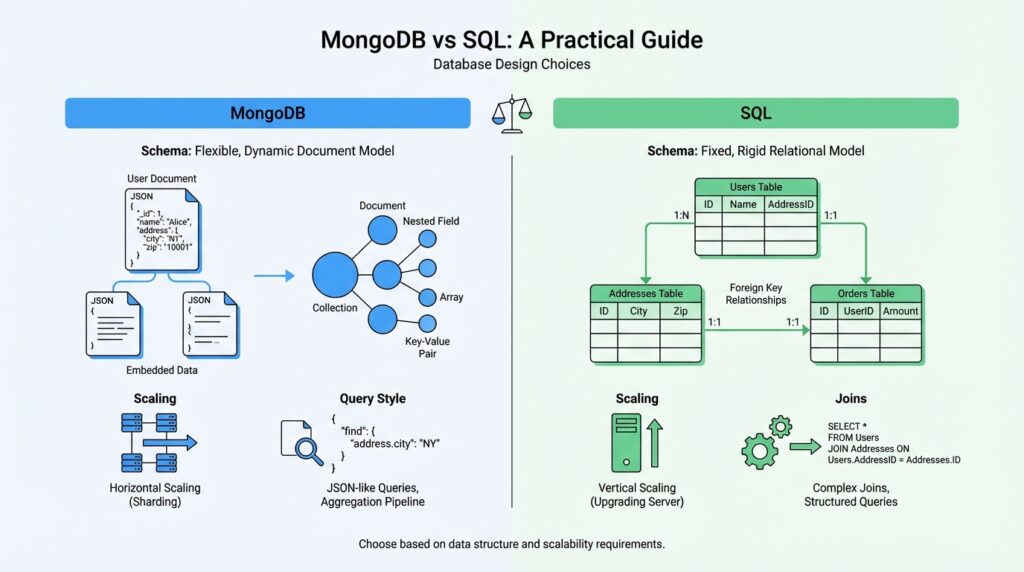
When you compare MongoDB vs SQL data models, the first thing to notice is that they ask you to think about your data in two different shapes. MongoDB uses a flexible document model, where a single collection can hold documents that do not all share the same fields or even the same field types, while SQL databases organize data into tables made of rows and columns, with each row following the table’s structure. If you’ve ever wondered, “How do I compare MongoDB vs SQL data models for a real project?” this is the heart of the answer: one model leans toward nested, self-contained records, and the other leans toward structured, repeatable tables.
That difference becomes clearer when we imagine a customer order. In MongoDB, we can keep the order details, line items, and delivery address together in one document, a bit like placing all the pieces of a recipe card inside one folder. MongoDB’s own documentation describes embedded documents as a way to store related data in a single document structure, which makes the whole record feel compact and easy to read in one pass. In SQL, we usually split that same information across tables, such as orders, order_items, and addresses, so each part has its own place and can be reused cleanly elsewhere.
That split is not a flaw; it is the logic of the relational model. SQL databases start from the idea that data should be organized into tables with consistent columns, so every row fits the same pattern and can be linked to other rows by keys. This makes the SQL data model feel like a set of neatly labeled drawers: each drawer has a specific purpose, and relationships between drawers stay explicit instead of being tucked inside one large record. In practice, that structure is powerful when the same data must serve many different queries, reports, and business rules.
MongoDB takes a different path. Because documents can vary within the same collection, the schema can evolve more gradually, and MongoDB’s schema design guidance describes this as a flexible schema that can be shaped iteratively. That flexibility makes MongoDB especially comfortable when the shape of the data changes often or when parts of the record naturally belong together. It can feel less like filling out a fixed paper form and more like arranging a toolkit: you keep the pieces you need close at hand, and you add new pieces when the job changes.
So which model is better? The better question is: which shape matches the way your application actually uses the data? If your app reads and writes a whole business object at once, MongoDB’s embedded document style can reduce the need to stitch data back together. If your app depends on shared reference data, strict consistency, and many cross-table relationships, the SQL model often stays easier to reason about because the structure is fixed and the relationships are explicit. That is the practical lesson of the MongoDB vs SQL data model comparison: design around access patterns first, then let the database model follow the work.
The safest way to hold both ideas in your head is to think in terms of boundaries. MongoDB asks, “What belongs together in one document?” SQL asks, “What should live in its own table and connect through relationships?” Once you see that, the rest of database design becomes less mysterious, because you are no longer choosing between two brands of storage; you are choosing between two ways of shaping information. And that choice is what will steer the next design decisions we make.
Schema Design Basics
Now that we have the broad shapes in view, schema design becomes the quiet work of deciding what lives together, what stays separate, and what your application needs to reach quickly. In both MongoDB schema design and SQL schema design, the real question is not, “What is the prettiest structure?” It is, “What will the software ask for most often?” That shift matters because a good schema makes ordinary tasks feel predictable, while a poorly shaped one turns every query into a small rescue mission.
A helpful way to begin is to imagine the data as a set of little conversations. Some pieces of information talk to each other constantly, like an order and its line items, while others only meet occasionally, like an order and the customer support notes attached to it later. When we design a schema, we are deciding which conversations should happen inside one record and which should happen through a relationship. That is why schema design basics always start with usage, not with storage.
If you are asking, “How do I design a database schema for MongoDB vs SQL?” the first move is to trace the shape of the work. In MongoDB, you often group data that is read together into one document, because that keeps the record self-contained and reduces the need to assemble it later. In SQL, we usually split data into related tables when the same information needs to be reused, filtered, or protected by clear rules. Both approaches are solving the same problem: helping the database answer the question your application will ask tomorrow morning.
This is also where the idea of normalization enters the story. Normalization means organizing data so each fact appears in one place, which reduces duplication and keeps updates tidy. SQL schema design often leans on this idea because tables can be linked with keys, which are unique identifiers that connect one row to another. MongoDB can use the same principle in a looser way, but it also allows denormalization, which means intentionally repeating some data in a document to make reads faster and simpler. That tradeoff is not a mistake; it is a design choice.
The tricky part comes when one fact seems to belong in two places at once. Maybe a customer name appears in many orders, or a product price should be preserved as it was at checkout rather than updated later. In those moments, we pause and ask whether the data is a living detail or a historical snapshot. That small distinction often decides whether we embed, reference, or duplicate a field, and it is one of the most important habits in MongoDB schema design basics.
Indexes matter here too, because schema design and indexing work hand in hand. An index is a special structure that helps the database find records faster, much like a book index helps you jump to a topic instead of scanning every page. If your schema groups data neatly but your most common search path is buried deep, the design will still feel slow. Good schema design anticipates the questions you will ask most often and places the most useful paths where the database can reach them quickly.
Another practical lens is change over time. SQL schema design often feels more formal because altering tables, constraints, and relationships usually follows a deliberate process. MongoDB’s flexible document model can feel more forgiving when new fields appear, but that flexibility still benefits from a plan, because unlimited freedom can create messy documents if every team member invents a different shape. The healthiest design in either system leaves room for growth without letting the structure drift into confusion.
So the real craft lies in making a few careful decisions early: what belongs together, what should stay independent, and what your application must protect or retrieve most often. Once we think that way, schema design stops feeling like abstract theory and starts feeling like mapmaking. We are not drawing data just for the database; we are drawing a path for every future query, update, and relationship that the system will need to handle.
Relationships and Joins
Now the story shifts from what belongs together to what must travel separately. In the earlier schema discussion, we decided which facts live in one place; here, we focus on the bridges between those facts. That is where relationships and joins enter the picture, and it is often the moment when MongoDB vs SQL feels most different. If you have ever asked, How do you handle relationships and joins in MongoDB vs SQL? you are asking the right question, because the answer shapes both your data model and your day-to-day queries.
In SQL, a relationship is a formal link between tables, usually built with a primary key and a foreign key. A primary key is the unique ID for a row, and a foreign key is a matching value in another table that points back to it. Think of it like a library card and a shelf label: one identifies the record, and the other tells you where to find the related one. This structure gives SQL relationships a very explicit feel, which is why SQL joins are such a central part of relational design.
A join is the action of combining rows from two or more tables so you can see connected information in one result. When we join orders to customers, for example, we are asking the database to assemble a story from separate chapters. That makes SQL relationships and joins especially useful when data is shared across many records, because each table can stay focused on one job while the query brings the pieces together when needed. In practice, this keeps data tidy without forcing you to duplicate it everywhere.
MongoDB handles the same problem with a different rhythm. Instead of relying on joins as the default move, MongoDB often encourages you to embed related data inside one document when those pieces are usually read together. When that is not enough, you can store references to related documents and connect them later, which gives you relationship-style design without locking everything into one structure. MongoDB relationships are therefore less about a fixed rule and more about choosing the right shape for the work your application does most often.
That difference matters because not every relationship behaves the same way. A one-to-one link, like a user and a profile, may fit neatly inside a single document or a single pair of SQL tables. A one-to-many link, like a customer and their orders, can also work well in both systems, but SQL usually leans on joins while MongoDB often leans on embedding or references depending on how often the orders are fetched together. A many-to-many link, like students and classes, usually pushes us back toward separate entities in either database, because trying to squeeze that pattern into one record can create confusion fast.
So the practical question is not whether relationships and joins exist in MongoDB vs SQL, but how much work you want the database to do when records meet. SQL expects those meetings to happen through joins, and that makes the relationships clear, reusable, and easy to query in many directions. MongoDB lets you decide whether related data should arrive already packed together or be assembled later with references or an aggregation stage like $lookup, which is MongoDB’s join-like feature. That flexibility can feel liberating, but it also asks you to think carefully about which queries matter most.
A good rule of thumb is to follow the path of the reader. If your application usually needs a full bundle of related information at once, MongoDB can keep that bundle close and reduce the need to stitch it together later. If your application often asks for slices of data from many directions, SQL joins usually make those questions easier to express and maintain. In both cases, the goal is the same: keep relationships honest, queries readable, and the design aligned with real use.
Once we see the difference this way, the choice becomes less mysterious. SQL relationships and joins give us a highly structured network, while MongoDB gives us more freedom to decide when to connect and when to keep things together. That tradeoff will matter again when we start weighing flexibility against consistency, because the way we connect data is often the way we shape the whole system.
Indexing for Performance
Once the schema has a shape, indexing is where the map starts saving time. In MongoDB indexing, the database keeps field values in a separate structure and searches that structure instead of scanning every document; PostgreSQL describes the same basic tradeoff for SQL indexing, where indexes make rows faster to find but also add overhead to the system. That is the first lesson to hold onto: indexes speed reads, but they are never free.
How do you know if an index is pulling its weight? Start with the query that repeats all day, because the best index is usually the one that matches a real pattern, not a hypothetical one. MongoDB calls it a covered query when the index contains every field the query scans and returns, so the database never has to touch the collection itself; PostgreSQL’s index-only scan follows the same idea for relational tables, answering from the index alone when the needed columns are already there. That is the performance sweet spot: less data touched, less work done, less time spent waiting.
The next question is the one that trips people up: how do you choose the right order for a compound index? MongoDB’s ESR rule says to place equality fields first, then sort fields, then range fields, because field order changes which queries the index can support efficiently. PostgreSQL says something very similar for multicolumn B-tree indexes: they can use any subset of columns, but they work best when the leading, leftmost columns are constrained, and columns to the right help less with narrowing the scan. In other words, the front of the index carries the most weight.
This is also where selectivity enters the story. A highly selective query matches a small slice of data, so an index can cut out a lot of unnecessary work, while a low-selectivity query may still need to examine a large portion of the index or even the table. MongoDB explicitly notes that predicates like $ne and $nin are often too broad to benefit much, and PostgreSQL’s planner may prefer a sequential scan when an index would not skip enough of the table to justify the extra steps. So even when an index exists, the real question is whether it narrows the search enough to matter.
Every index also charges a small fee on the write path. MongoDB updates both the collection and its indexes on writes, and its documentation warns that too many indexes can hurt performance before the 64-index limit is reached, especially in write-heavy collections. PostgreSQL says the same thing more generally: indexes are useful, but they add overhead to the whole database system and should be used sensibly. This is why good MongoDB indexing and good SQL indexing both feel a little restrained; we add only the indexes that pay for themselves.
The final habit is to keep checking whether yesterday’s index still matches today’s workload. MongoDB recommends finding common query shapes with $queryStats, checking usage with $indexStats, and removing unused indexes when they stop earning their keep. PostgreSQL’s guidance is similar in spirit: use EXPLAIN, gather statistics with ANALYZE, and test with real data rather than guesses. That keeps indexing for performance from becoming a one-time decision and turns it into a living part of database design.
Transactions and Consistency
The moment we talk about MongoDB transactions and SQL transactions, we leave the realm of structure and step into the realm of trust. A transaction is a group of database actions that succeed or fail as one unit, and consistency is the promise that the data still makes sense after those actions finish. MongoDB gives every single-document write atomicity, meaning the whole change lands together or not at all, and PostgreSQL shows the classic SQL pattern: begin a transaction, do the work, then commit or roll back as one unit.
This is where MongoDB’s consistency story starts to feel more like a set of dials than a single switch. MongoDB uses read concern and write concern to control what data you can see and how firmly a write must land, and in multi-document transactions, the strongest familiar pairing is snapshot read concern with majority write concern, which gives you a snapshot of majority-committed data. That matters when you have related facts spread across documents, because you are no longer relying only on document-level atomicity; you are asking MongoDB to protect a wider business action.
SQL databases, by contrast, tend to make the safety story feel more formal and centralized. In PostgreSQL, which is a good reference point for the SQL world, the default isolation level is READ COMMITTED, meaning each statement sees only data committed before it begins, and you can move up to REPEATABLE READ or SERIALIZABLE when you need a stronger promise. At the highest level, PostgreSQL will roll back one transaction if the mix of concurrent reads and writes would create a result that could not happen in any one-at-a-time execution.
So how do you think about transactions and consistency in MongoDB vs SQL when you are designing a real system? The useful shortcut is to ask whether the thing you are protecting lives mostly as one bundle or as several linked pieces. If your earlier schema choices kept an order, its line items, and its address together in one document, MongoDB can often protect that action with one atomic write and fewer cross-document moves; if your design spreads the same business event across several tables, SQL makes the boundaries explicit and then uses the transaction to keep the whole sequence honest. That is an inference from the transaction rules and document model, but it is usually the design pattern teams follow in practice.
The deeper lesson is that consistency is not about making every read and write equally strict; it is about choosing the right promise for the job. MongoDB lets you tune that promise with concerns and transactions, which is helpful when the data shape is flexible and the application can tolerate some design freedom. SQL databases, especially in the PostgreSQL style, give you a more rigid isolation ladder, which makes them feel steadier when many queries must agree on the same shared truth. In both cases, the design question stays the same: what action should never be seen half-finished, and what level of consistency do we need to protect it?
Choosing the Right Fit
By the time we reach the decision point, the question is no longer which database looks more powerful. It is which one fits the way your application will live day after day. In the MongoDB vs SQL conversation, the right fit usually appears when you match the model to the work: fast-changing product data often feels at home in MongoDB, while highly structured business data often feels steadier in SQL. If you are asking, “Should I use MongoDB or SQL for this project?” that is the right place to begin, because the best choice usually comes from the shape of the workload, not the shape of the buzz around it.
The easiest way to narrow the field is to follow the data’s natural rhythm. When records are read as a whole, updated as a whole, and rarely split apart, MongoDB often feels comfortable because a single document can carry the full story. When the same facts must be reused across many screens, reports, and rules, SQL often wins because its tables keep each fact in a stable, reusable place. In other words, MongoDB vs SQL is not a contest of good versus bad; it is a question of whether your data behaves more like a self-contained packet or a set of linked parts.
Change over time matters just as much as the starting shape. If your schema is still shifting, MongoDB schema design can give you room to learn from real usage before locking every field into place. That flexibility is helpful when you are building a new product and do not yet know which details will matter most. SQL schema design, on the other hand, can feel like a better fit when the business rules are already clear and you want the structure to enforce them from the beginning.
Think, too, about how much your system depends on shared truth. If many teams or features need the same customer, product, or billing data, SQL often makes those relationships easier to govern because the structure is explicit and consistent. If the application mostly cares about one domain object at a time, MongoDB can reduce the friction of assembling that object from several places. The practical difference is subtle at first, but over time it shows up in query complexity, maintenance effort, and how often you have to explain the schema to someone new.
Operational habits also point the way. Teams that value strict reporting, careful auditing, and predictable joins often feel more comfortable with SQL because the relational model gives them familiar guardrails. Teams that move quickly, ship evolving features, and want to keep related data close together may prefer MongoDB because the document model makes change feel less heavy. Neither path is automatically simpler; the better fit is the one that matches your team’s habits and the decisions you want the database to help you make.
Storage alone should never make the final call. A database choice also affects how you index, how you handle transactions, how you test queries, and how much structure your developers must remember. MongoDB vs SQL becomes much clearer when you ask which tradeoffs you are willing to carry: flexibility with more design discipline, or structure with more upfront planning. That tradeoff is the real cost of the choice, and noticing it early saves a lot of redesign later.
So the safest answer is to start small and honest. Describe the most common query, the most common update, and the most awkward edge case, then see which model handles those three moments with less strain. When MongoDB schema design fits the way your app actually behaves, the document model feels natural; when SQL schema design matches the business rules more closely, the relational model tends to stay calmer under pressure. The right fit is the one that makes the next hundred questions easier to answer, not the one that sounds best in the abstract.