Voice Agent Basics
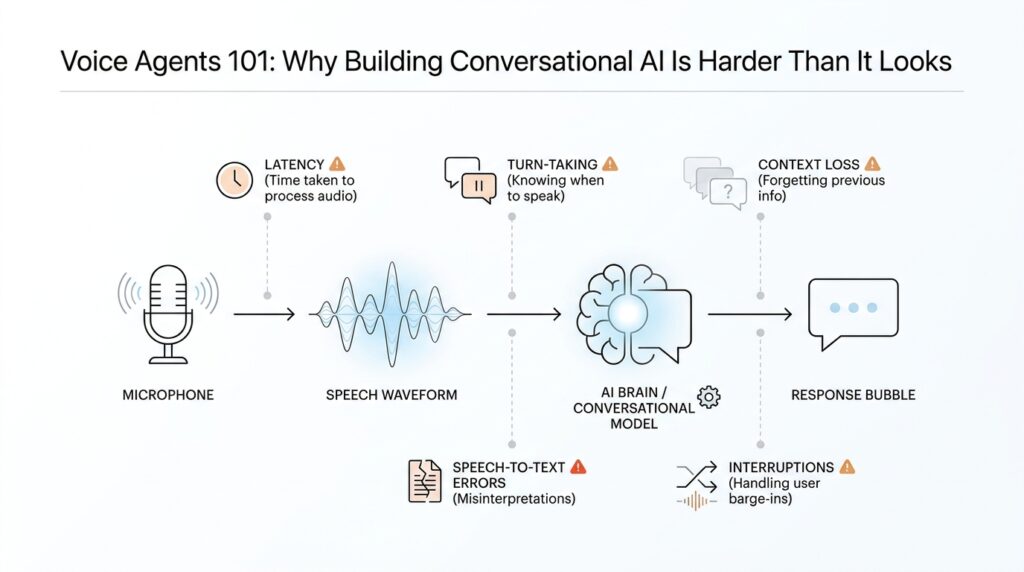
When you first meet a voice agent, it can feel a little like magic: you speak, it listens, and then it answers out loud. But under the surface, conversational AI has to do several jobs at once, and that is where the real difficulty begins. What makes a voice agent different from a chatbot you type into? The short answer is timing. A voice agent has to hear audio, understand intent, decide what to say, and speak back fast enough that the exchange still feels human.
The easiest way to picture the machine room is to imagine two routes. In a speech-to-speech setup, the model works directly with live audio, which can reduce latency, the delay between your words and the agent’s reply. In a chained voice pipeline, the system takes a relay-race approach: speech-to-text turns audio into text, the agent reasons over that text, and text-to-speech turns the answer back into sound. Both are valid voice agent designs, but they serve different needs, and that choice shapes everything that follows.
This is also why voice agents feel harder than text-only systems. In text, you can pause, reread, and edit your thought before sending it. In speech, the conversation keeps moving, so the agent has to know when you are finished, when it should speak, and when it should stay quiet. Conversation design guidance from Google emphasizes turn-taking, meaning the back-and-forth rhythm of who has the floor, and it warns against overloading the user with too many questions at once. That is the hidden art of a voice agent: not just answering, but answering at the right moment.
Silence matters here too. Voice activity detection, often shortened to VAD, is the logic that helps a system notice speech, pauses, and the end of a turn. In a good voice agent, VAD works like a thoughtful host at a dinner table: it notices when someone is still talking, when they have finished, and when it is time to respond. OpenAI’s realtime guidance also shows that developers can keep that turn-detection behavior while deciding manually when a response should be created, which matters when you want more control over interruptions or back-and-forth flow.
Once the agent does respond, the wording has to be shaped for the ear, not the eye. Spoken replies should be short, clear, and easy to follow because users cannot skim them the way they skim text. OpenAI’s realtime prompting guidance recommends concise instructions and even notes that brief, structured guidance works better than long paragraphs for these models, while Google’s conversation design guidance encourages one question at a time and avoiding conversations that monopolize the user’s attention. That is why strong voice agents sound calm and purposeful instead of chatty and clever.
There is one more piece that beginners often miss: a voice agent is not only a speaker, it is also a traffic director. It may need tools, handoffs, and escalation paths when it cannot finish the job on its own. OpenAI’s voice-agent guidance describes using tools, streaming, interruptions, and human handoff inside the same workflow, because real conversations rarely stay neatly on one track. So as we think about voice agents, we are really looking at a system that listens, times its turn, keeps its answers brief, and knows when to ask for help. That is the foundation of conversational AI in voice form.
Core Pipeline Overview
When you ask a voice agent a question, it feels like a single smooth moment. Under the hood, though, a voice agent pipeline is moving your words through a small chain of jobs: capture the audio, notice when your turn starts and ends, interpret what you meant, decide what to do, and then speak back in time to keep the conversation alive. OpenAI’s Realtime stack is designed for low-latency speech-to-speech interaction, and Google’s conversation guidance treats turn-taking as one of the core rules of spoken dialogue, which is why this pipeline matters so much.
If you have ever wondered, “What does a voice agent actually do between my speaking and its reply?”, this is the answer. The first checkpoint is voice activity detection (VAD), or logic that notices when speech begins and ends. In practice, VAD helps the system avoid guessing too early or waiting too long, which is a little like a good waiter who knows when you are still reading the menu and when you are ready to order. OpenAI’s Realtime docs say VAD is enabled by default in speech-to-speech and transcription sessions, and they also expose turn-detection controls so developers can tune when the system should respond.
Once the system has a clean turn, the next stage is understanding. In a chained voice agent pipeline, that usually means speech-to-text—turning spoken audio into written text so the model can read, reason, and route the request through downstream logic. That extra translation step can feel invisible, but it is what lets the agent search a record, check a calendar, or decide whether it needs to ask a follow-up question. In other words, transcription is the bridge that turns a passing sound wave into something the rest of the system can work with.
From there, the agent has to choose between answering, acting, or handing off. This is where tools come in, meaning outside capabilities such as a lookup, a booking flow, a database query, or a path to a human agent. OpenAI’s voice-agent guidance specifically calls out tools and human handoff, and it also notes that some critical information may be better placed directly in the prompt instead of forcing the model to call a tool first. That choice matters because conversational AI becomes fragile when every answer has to take the long way around.
Then comes the part users actually hear: text-to-speech (TTS), which turns the final answer into spoken audio. But a good reply is not written the same way as a message on a screen, because listeners cannot skim or reread. Google’s conversation design guidance recommends one question at a time and warns against monopolizing the conversation, while OpenAI’s realtime guidance favors concise prompting so the model stays focused and responsive. That is why strong voice agents tend to sound calm, brief, and purposeful instead of clever and chatty.
The pipeline also has to keep listening after it starts speaking, because real conversations rarely stay polite and tidy. OpenAI’s Realtime docs say VAD can detect user speech, cancel an in-progress response, and start a new one, and they also allow developers to disable automatic response creation while keeping turn detection in place. That gives teams more control for moderation, validation, or any workflow where the agent should pause before talking. The result is a voice agent pipeline that behaves less like a recorder and more like a responsive conversation partner.
Once you see these pieces together—audio capture, turn detection, understanding, tools, speech generation, and interruption handling—you start to see why conversational AI in voice form is harder than it first appears. We are not only generating answers; we are choreographing timing, attention, and handoffs in real time. That choreography is the heart of the system, and it is the part we need to understand before we can make a voice agent feel natural.
Latency and Response Time
Latency and response time are where a voice agent either feels alive or feels stuck in traffic. When you speak, even a small pause can feel much longer than it really is, because your ear is waiting for proof that the system heard you and your brain is already listening for the next turn. OpenAI’s Realtime stack is built for low-latency speech-to-speech interaction, and Google’s conversation design guidance treats turn-taking as one of the core rules of spoken dialogue.
Latency is the delay between your words and the moment the agent starts reacting; response time is the larger wait until you hear something useful back. That distinction matters because voice is not like text, where you can glance away and come back later. In spoken conversation, timing carries meaning, and Google notes that the brain begins preparing the next words before the other person has fully finished, which is one reason a lag can make a conversation feel awkward so quickly. Why does a half-second matter so much? Because in voice, a tiny gap can feel like a broken turn rather than a thoughtful pause.
The fastest path is direct speech-to-speech processing, where the model works with audio without first converting everything into text. OpenAI describes this as one of the strongest features of the Realtime API, and it is the reason a voice agent can feel more immediate than a chained pipeline. By contrast, a speech-to-text, reasoning, and text-to-speech flow gives you more control, but each extra handoff adds another small delay to the clock. That trade-off is the heart of latency in conversational AI: more modular systems are often easier to control, while more direct systems are often easier to keep feeling natural.
Response time is not only about moving fast; it is also about knowing when to start moving. Voice activity detection, or VAD, is the logic that notices when the user has started or stopped speaking, and OpenAI says Realtime sessions enable it by default. That matters because a voice agent that responds too early cuts people off, while one that waits too long makes them wonder whether it is still listening. OpenAI also documents that when VAD is enabled, the system can cancel an in-progress response and start a new one if the user interrupts, which keeps the conversation from feeling brittle.
The words the agent speaks also shape perceived latency, because long answers take longer to deliver and longer to process. Google recommends giving the user only one question at a time and avoiding conversations that monopolize the turn, while OpenAI’s prompting guidance recommends concise instructions and suggests putting critical information directly in the prompt instead of forcing extra tool calls first. Those choices do more than save time; they make the voice agent easier to follow, because spoken language has to land in the ear, not on a page. A short, well-timed reply often feels faster than a technically quick but overstuffed one.
Once we start thinking this way, latency becomes less like a single technical metric and more like a design decision spread across the whole experience. OpenAI notes that WebRTC is generally the better fit for browser-based low-latency applications, while WebSockets are often the better choice for server-side use cases such as phone calls. That means response time depends not only on the model, but also on the path the audio takes, how turn detection is configured, and whether the agent is allowed to speak immediately or wait for confirmation. In other words, the feeling of speed is something we shape on purpose.
Interruptions and Turn-Taking
Imagine you are mid-sentence and the voice agent starts talking back a beat too soon. The problem is not the answer itself; it is the handoff. In spoken conversation, turn-taking is the rhythm of who has the mic, and Google’s conversation design guidance says good systems make that rhythm clear, avoid interrupting the user, and ask one question at a time instead of piling on several at once. That is why interruptions and turn-taking sit at the center of voice agents: if the timing feels wrong, the whole conversation feels off.
What happens when you start talking over a voice agent? In real life, people do this all the time, so a voice system has to treat interruptions as part of the normal flow, not as a rare error. OpenAI’s Realtime API uses voice activity detection, or VAD, which is logic that detects when the user starts and stops speaking, and it can automatically cancel an in-progress response when new user speech arrives. OpenAI also offers semantic VAD, which uses the words and audio together to judge whether the user is really done speaking, reducing the chance that the agent cuts someone off too early.
That gives us a useful design choice. Some voice agents should respond automatically the moment VAD says the user is finished, while others should keep listening but wait for a manual decision before answering. OpenAI lets developers keep VAD on while setting turn_detection.create_response and turn_detection.interrupt_response to false, which means the system still emits speech-turn events but does not speak unless you tell it to. In practice, this is the difference between a host who jumps in as soon as a guest pauses and a host who waits for a quiet signal before speaking; both can work, but they create very different conversational AI experiences.
The wording of the reply matters just as much as the timing. Google’s guidance warns against monopolizing the conversation, and OpenAI’s realtime prompting guidance recommends warm, concise, confident responses and even suggests planning for only a few sentences per turn. That is because a spoken turn is not a paragraph on a page; it is a single moment the listener has to hold in working memory. If the agent rambles, it makes turn-taking harder, because the user has less room to jump in, correct it, or steer the conversation.
So the real skill in voice agents is not sounding smart for one long stretch; it is staying responsive across many small exchanges. A good system listens for speech, notices when the floor changes, and knows whether to continue, pause, or yield. OpenAI’s Realtime docs describe interruption handling as canceling the current response and starting a new one, while Google’s conversation design guidance frames the user experience around clear turns and clear invitations to respond. Once we start thinking this way, interruptions stop looking like a nuisance and start looking like choreography, which is exactly how a natural voice agent keeps the conversation moving.
Context and Memory Handling
If you have ever watched a voice agent forget your name halfway through a conversation, you have already met the real problem: context and memory handling. The hard part is not making the model talk; it is deciding what the system should carry forward, what it should summarize, and what it should let go. In practice, a voice agent is working with conversation state, which OpenAI describes as the information preserved across turns, while Google’s conversation design guidance reminds us that spoken interaction puts a heavy load on short-term memory.
So what does a voice agent actually remember? The first thing to understand is that it does not remember like a person does. It remembers what the application includes in the conversation, or what the platform stores as conversation state, and that state can travel across turns so the agent can keep track of the thread. OpenAI’s APIs support both manual state management, where you pass earlier messages back in yourself, and conversation objects that persist items like messages and tool outputs across sessions.
This is where the context window enters the story. A context window is the maximum amount of information a model can consider at once, and it includes input, output, and sometimes reasoning tokens. That means memory is always bounded, even when the conversation feels continuous to the user. OpenAI warns that large prompts or long threads can exceed the window and lead to truncation, which is the point where older material drops out of the model’s active view.
In voice, that limit matters even more because the user cannot reread what was said. If the agent loses the thread, the listener feels the break immediately. Google’s guidance points out that all this detail burdens the user’s short-term memory, and that the persona has to keep track of context to understand what the user means next. In other words, context and memory handling are really about protecting the human on the other side of the conversation.
A good design usually splits memory into layers, and that is a helpful mental model for beginners. One layer holds the live turn-by-turn exchange, another layer holds durable facts like a user’s preferred name or a booking reference, and a third layer may hold a short summary of earlier turns. OpenAI’s Realtime docs make this distinction practical by letting you keep responses in the default conversation state, or generate out-of-band responses when something should not become part of the main thread. That flexibility helps you decide what should stay in working memory and what should stay temporary.
This is also where the trade-offs start to show up. If you keep too much history, the conversation can become expensive and slower, and OpenAI notes that long sessions may be truncated when token limits are reached. If you keep too little, the agent starts acting forgetful, repeating questions or missing important details. The sweet spot is usually to preserve only the context the next turn truly needs, while compressing the rest into a compact summary that carries the meaning forward without dragging every word along with it.
That is also why prompt design matters so much in voice agents. OpenAI’s guidance on conversation state and prompt caching emphasizes keeping stable instructions at the beginning of the prompt and changing content at the end, because that structure helps the system preserve useful context and avoid unnecessary churn. Google’s conversation design guidance echoes the same instinct in a more human way: give enough context to respond, but do not overload the listener. When we get context and memory handling right, the voice agent feels less like a machine replaying text and more like a partner that actually knows where the conversation has been.
Testing With Real Users
You can stare at your voice agents in the simulator for days and still miss the moment real people get lost. That is why testing with real users matters so much in conversational AI: it surfaces the awkward pauses, unexpected phrasing, and tiny bits of friction that polished internal demos hide. Google’s guidance says there is no substitute for feedback from actual users, and it recommends usability testing before you write code so you can catch problems early.
How do you know whether your voice agent is actually usable? We start by finding someone unfamiliar with the project, not a teammate who already knows the flow, because outsiders react the way first-time users will. Google recommends a quick Wizard of Oz prototype, where a person behind the curtain simulates the agent, so you can test the experience without building the full system yet. For voice agents, that makes the earliest version feel surprisingly real while still staying cheap and flexible.
This is where the test becomes a conversation rather than a checklist. Ask the participant to speak naturally, let them go off script, and record the session with permission so we can listen back later and notice details we missed in the moment. Google specifically recommends talking it out, recording sessions, and focusing on behavior rather than opinions, because what people do tells us more than what they say they like. Those recordings become a kind of replay button for your product thinking, which is especially useful in conversational AI.
Once the basic flow works, we widen the circle. Google’s testing guidance describes limited Alpha and Beta releases as a way to gather real-world feedback before public launch, and that is especially valuable for voice agents because devices, accents, and speaking styles vary so much in the wild. OpenAI’s eval guidance points in the same direction: use representative, production-like inputs, log what happens, and compare behavior against the kinds of requests people actually make. In other words, we stop asking whether the agent works in theory and start asking whether it survives real conversations.
When we listen back, we are not hunting for compliments; we are hunting for signals. Did the user hesitate because the prompt was too long, ask for help because the call to action was vague, or say something unexpected that your design never covered? Google’s checklist calls out natural conversation, confusion, unexpected utterances, and frustration as the moments that tell you where to refine the flow, and those clues are gold for voice agents. This is often where the first draft stops sounding like a clever demo and starts becoming something people can actually use.
The real payoff is that testing with real users turns your voice agent from a theory into something you can trust. It helps you see whether the timing feels human, whether the wording lands in the ear, and whether the handoffs make sense when someone is tired, rushed, or speaking in their own style. That lesson reaches beyond one prototype: the best conversational AI is not the system that looks perfect on paper, but the one that keeps making sense after ten different people try to break it.